Chart position — tracked daily by LaunchShots
Screenshot style breakdown
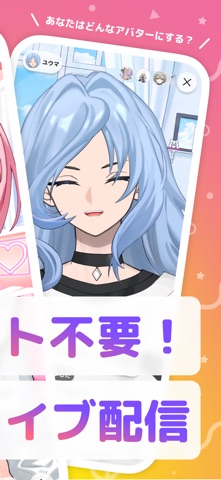
Sampled from 5 of Avvy(アヴィ) | VTuberアバターライブ配信's App Store screenshots — background, accent and theme, measured by LaunchShots (not something Apple publishes).
#FC7494 bg
#DD6682
#FCCC24 accent
#111111 text
Screenshots




Icon palette
About this app
Avvy(アヴィ)は、誰でもスマホ一つで2Dアバターを作成でき、 顔出しなし・機材なしでライブ配信を始められる、VTuberアバター作成・配信アプリです。 新機能:アプリ内ライブ配信がついに登場! OBS連携だけでなく、Avvyアプリ内からそのままライブ配信が可能になりました。 アバターを自由にカスタマイズし、スマホのカメラで表情をトラッキング。 Live2Dのような滑らかで自然な動きで、“あなたらしさ”をそのまま表現できます。 VTuberになりたいけど、モデル依頼は高額だし、イラスト発注の仕方も分からない… そんな悩みを「Avvy(アヴィ)」が解決します! ============================= 【新登場:アプリ内ライブ配信機能】 スマホだけでVTuberデビュー!顔出し不要・初期投資ゼロで始められます 【自由度の高いカスタマイズ】 髪型・服装・カラーなどを自由に組み合わせ、理想の2Dアバターを作成できます 【高品質フェイストラッキング】 Live2Dのような滑らかな2Dアニメーションで作ったアバターを動かせます 【外部配信で収益化可能】 作ったアバタ…
App details
What you can learn from Avvy(アヴィ) | VTuberアバターライブ配信
Every shipping app on the App Store has gone through the same decisions you're working through right now: which screenshot goes first, what caption sits over it, which device frame to show, what color the background should be. The 5 screenshots above are Avvy(アヴィ) | VTuberアバターライブ配信's answers to those questions — they're public, they're real, and they made it through Apple's review.
What the numbers say: Avvy(アヴィ) | VTuberアバターライブ配信 runs a light set where the background shifts from screenshot to screenshot (first shot #FC7494) — each image has to stand on its own, so the captions carry more of the story. The accent colour we picked up, #FCCC24, is the one to reuse for badges, arrows and highlighted words if you borrow this look. Hit Use this style to open the editor with these exact colours and drop your own screenshot in.
Notice the first screenshot in particular. It's the one users see in search results and on the product page, and it's where most apps spend their best caption and tightest design. Look at the proportion of background to phone, where the text sits, what one thing the image is trying to communicate.
Want to see how other Social Networking apps approach the same problem? Browse more Social Networking apps in the showcase.
Take what works into your own screenshots
Open LaunchShots and design your App Store & Google Play screenshots — pick a device frame, drop captions, ship in minutes. Free, in your browser.
Open the screenshot editor →Apps with a similar look
Closest background + accent colours among the listings we've analysed — useful when you want to see the same palette handled by a different team.