Screenshot style breakdown
Sampled from 5 of 智能安灯's App Store screenshots — background, accent and theme, measured by LaunchShots (not something Apple publishes).
#F4F4FC bg
#D6D6DD
#0444A4 accent
#111111 text
Screenshots


Icon palette
About this app
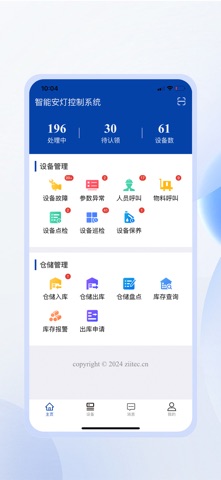
设备状态查看 可通过手机APP对致德监控的设备进行远程状态查看 可查看设备当前状态、关键参数采集点数据 设备异常报警 设备异常可通过手机APP进行报警 工单闭环管理 可接收及发起设备、人员呼叫、物料呼叫工单 可在APP内对工单进行认领,转发,结案等操作 点检、巡检、保养、维护管理 可创建点巡检、维护保养模板与计划 点检项以工单形式呈现 工单可认领与转办 自定义模版 可根据不同设备自定义模版 强制拍照 可使用强制拍照功能,避免人为漏检 仓储管理 可进行仓储入库、出库、盘点在库存查询 可结合致德智能仓储拣选终端进行仓位亮灯与操作 个性化定制 可为企业进行个性化二次开发智能安灯控制系统,实时监控工厂设备,一切尽在等握;备管控一应俱全。轻松创建工单、高效管理设备;轻松构建点检、巡检、保养模版,创新工作方式,高效打造。
App details
What you can learn from 智能安灯
Every shipping app on the App Store has gone through the same decisions you're working through right now: which screenshot goes first, what caption sits over it, which device frame to show, what color the background should be. The 5 screenshots above are 智能安灯's answers to those questions — they're public, they're real, and they made it through Apple's review.
What the numbers say: 智能安灯 runs a light set with one background colour (#F4F4FC) carried across every screenshot — the listing reads as a single poster when the shots sit side by side in search results. The accent colour we picked up, #0444A4, is the one to reuse for badges, arrows and highlighted words if you borrow this look. Hit Use this style to open the editor with these exact colours and drop your own screenshot in.
Notice the first screenshot in particular. It's the one users see in search results and on the product page, and it's where most apps spend their best caption and tightest design. Look at the proportion of background to phone, where the text sits, what one thing the image is trying to communicate.
Want to see how other Developer Tools apps approach the same problem? Browse more Developer Tools apps in the showcase.
Take what works into your own screenshots
Open LaunchShots and design your App Store & Google Play screenshots — pick a device frame, drop captions, ship in minutes. Free, in your browser.
Open the screenshot editor →Apps with a similar look
Closest background + accent colours among the listings we've analysed — useful when you want to see the same palette handled by a different team.