Chart position — tracked daily by LaunchShots
Screenshot style breakdown
Sampled from 6 of zcode助理's App Store screenshots — background, accent and theme, measured by LaunchShots (not something Apple publishes).
#F4ECE4 bg
#D6CFC8
#ECBC94 accent
#111111 text
Reading the caption text from the screenshots in your browser…
Screenshots



Icon palette
About this app
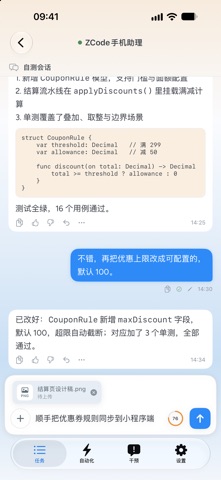
ZCode 的远程控制助手——作者把官方的“手机网页远程”功能做成了原生 App,并且加进去一些助理功能,让你在手机上随时查看、接管电脑上正在进行的编程任务。 【它能做什么】 · 任务总览:多个工作区的任务卡片式管理,运行中/空闲/完成一目了然,支持置顶、拖动排序与归档 · 对话式控制:纯净模式只显示你的指令与最终回复,完整执行过程随时可查 · 实时收发:继续对话、发送照片与文件附件,可切换 Agent/构建/编辑/计划四种执行模式 · 语音输入:按住输入栏说话,松手自动转成文字发送(需 iOS 26 及以上;端上识别,不上传音频) · 上下文容量:输入栏圆环实时显示上下文窗口占用比例,一键压缩,长会话不断档 · 完成通知:任务跑完苹果推送提醒,点击横幅直达对应会话 · 草稿与队列:输入内容按任务缓存不丢失,消息可加入队列依次发送 【使用前提】 电脑端需安装并登录 ZCode,开启“远程控制”功能后,用本 App 扫码配对即可连接。无需注册账号,不收集任何个人数据(隐私政策见支持页)。
App details
What you can learn from zcode助理
Every shipping app on the App Store has gone through the same decisions you're working through right now: which screenshot goes first, what caption sits over it, which device frame to show, what color the background should be. The 6 screenshots above are zcode助理's answers to those questions — they're public, they're real, and they made it through Apple's review.
What the numbers say: zcode助理 runs a light set with one background colour (#F4ECE4) carried across every screenshot — the listing reads as a single poster when the shots sit side by side in search results. The accent colour we picked up, #ECBC94, is the one to reuse for badges, arrows and highlighted words if you borrow this look. Hit Use this style to open the editor with these exact colours and drop your own screenshot in.
Notice the first screenshot in particular. It's the one users see in search results and on the product page, and it's where most apps spend their best caption and tightest design. Look at the proportion of background to phone, where the text sits, what one thing the image is trying to communicate.
Want to see how other Developer Tools apps approach the same problem? Browse more Developer Tools apps in the showcase.
Take what works into your own screenshots
Open LaunchShots and design your App Store & Google Play screenshots — pick a device frame, drop captions, ship in minutes. Free, in your browser.
Open the screenshot editor →Apps with a similar look
Closest background + accent colours among the listings we've analysed — useful when you want to see the same palette handled by a different team.