Screenshot changes — detected by LaunchShots
Screenshot style breakdown
Sampled from 5 of Audio Jam: AI for ミュージシャン's App Store screenshots — background, accent and theme, measured by LaunchShots (not something Apple publishes).
#FCFCFC bg
#DDDDDD
#D40414 accent
#111111 text
Screenshots


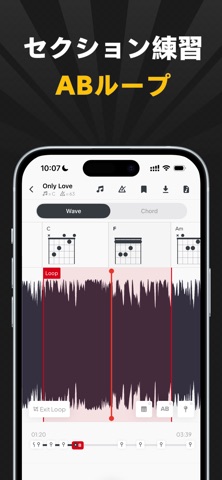

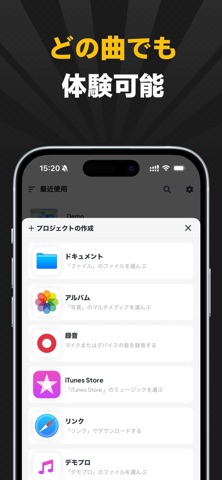
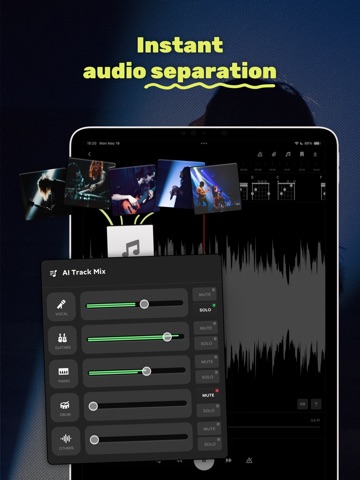
iPad screenshots


Icon palette
About this app
# プロの音楽家耳コピのために作られた AudioJamは、あなたの中のプロの音楽家のための強力な音楽学習ツールです。 AI伴奏は、楽器トラック、ABループを抽出し、テンポやピッチを調整... 楽譜のピッキングや曲の練習をより効率的に。 ## 主な機能 - AudioAI:ボーカル、ドラム、ベース、キーボード、ピアノ、ギター、主音ギター、リズムギターなどの楽器トラックを任意の曲から分離します。分離した曲の音量を調整することができます。 - ABループ再生:常時ABループ繰り返し再生時の音声の開始点、終了点を設定します。 - オーディオブックマーク:オーディオの特定の位置をブックマークし、その後、対応する位置に簡単にジャンプすることができます。 - Tempo, Pitch Skip:ピッチやスピードを調整することができます。 - 音楽アクセサリー:音楽関連のアクセサリーをインポートでき、Guitar ProやMusicXMLスコアのプレビュー再生に対応します。 - Countdown to entry:拍子に合わせてカウントダウンすることで、曲に合わせてより効果的な練習ができます。 …
App details
What you can learn from Audio Jam: AI for ミュージシャン
Every shipping app on the App Store has gone through the same decisions you're working through right now: which screenshot goes first, what caption sits over it, which device frame to show, what color the background should be. The 12 screenshots above are Audio Jam: AI for ミュージシャン's answers to those questions — they're public, they're real, and they made it through Apple's review.
What the numbers say: Audio Jam: AI for ミュージシャン runs a mixed light-and-dark set where the background shifts from screenshot to screenshot (first shot #FCFCFC) — each image has to stand on its own, so the captions carry more of the story. The accent colour we picked up, #D40414, is the one to reuse for badges, arrows and highlighted words if you borrow this look. Hit Use this style to open the editor with these exact colours and drop your own screenshot in.
Notice the first screenshot in particular. It's the one users see in search results and on the product page, and it's where most apps spend their best caption and tightest design. Look at the proportion of background to phone, where the text sits, what one thing the image is trying to communicate.
Want to see how other Music apps approach the same problem? Browse more Music apps in the showcase.
Take what works into your own screenshots
Open LaunchShots and design your App Store & Google Play screenshots — pick a device frame, drop captions, ship in minutes. Free, in your browser.
Open the screenshot editor →Apps with a similar look
Closest background + accent colours among the listings we've analysed — useful when you want to see the same palette handled by a different team.