Chart position — tracked daily by LaunchShots
Screenshot style breakdown
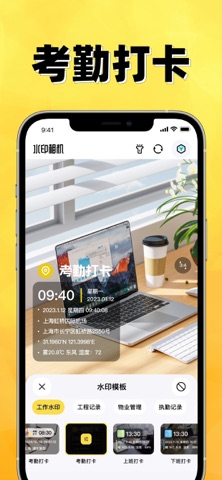
Sampled from 4 of 水印相机-时间地点和工作水印,工作记录证明's App Store screenshots — background, accent and theme, measured by LaunchShots (not something Apple publishes).
#FCEC5C bg
#DDCF50
#BC946C accent
#111111 text
Screenshots


Icon palette
About this app
《水印相机-时间地点和工作水印,工作记录证明》是一款有考勤打卡、执勤巡检、工程记录、旅行打卡、物业管理等丰富的水印模板,支持不同场景拍照打卡记录的水印相机。 产品简介: 【小工具】 图片优化等多种小工具,方便实用。 【拼图】 多种拼图模版,工作报告拼图。 【水印信息】时间、天气、地点、海拔、经纬度、心情、工作、负责人等丰富水印模板信息。 【水印类型】工作水印:工作拍照、考勤打卡、工程记录、值班记录,电路巡检,物业管理,外勤拍照等。通用水印:日常生活记录,旅行拍照、宝宝成长拍照、记录美好生活,很多人都在用! 【VIP会员】 - 付款:用户确认购买并付款后记入 iTunes 账户。 - 取消续订:如需取消续订,请在当前订阅到期 24 小时以前,手动在iTunes/Apple ID 设置管理中关闭自动续订功能。- 续订:苹果 iTunes 账户会在到期前 24 小时内扣款,扣款成功后订阅周期顺延相应期限。 - EULA:https://p.kdocs.cn/s/KIC4FOQ7AAAHG
App details
What you can learn from 水印相机-时间地点和工作水印,工作记录证明
Every shipping app on the App Store has gone through the same decisions you're working through right now: which screenshot goes first, what caption sits over it, which device frame to show, what color the background should be. The 4 screenshots above are 水印相机-时间地点和工作水印,工作记录证明's answers to those questions — they're public, they're real, and they made it through Apple's review.
What the numbers say: 水印相机-时间地点和工作水印,工作记录证明 runs a light set with one background colour (#FCEC5C) carried across every screenshot — the listing reads as a single poster when the shots sit side by side in search results. The accent colour we picked up, #BC946C, is the one to reuse for badges, arrows and highlighted words if you borrow this look. Hit Use this style to open the editor with these exact colours and drop your own screenshot in.
Notice the first screenshot in particular. It's the one users see in search results and on the product page, and it's where most apps spend their best caption and tightest design. Look at the proportion of background to phone, where the text sits, what one thing the image is trying to communicate.
Want to see how other Photo & Video apps approach the same problem? Browse more Photo & Video apps in the showcase.
Take what works into your own screenshots
Open LaunchShots and design your App Store & Google Play screenshots — pick a device frame, drop captions, ship in minutes. Free, in your browser.
Open the screenshot editor →Apps with a similar look
Closest background + accent colours among the listings we've analysed — useful when you want to see the same palette handled by a different team.