Chart position — tracked daily by LaunchShots
Screenshot changes — detected by LaunchShots
Screenshot style breakdown
Sampled from 3 of OpenDurian - เปิด ดู เรียน's App Store screenshots — background, accent and theme, measured by LaunchShots (not something Apple publishes).
#FCFCFC bg
#DDDDDD
#1CB46C accent
#111111 text
Screenshots


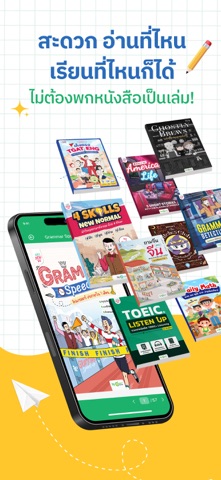
iPad screenshots


Icon palette
About this app
ฟีเจอร์พร้อมสำหรับนักอ่านทุกคน! Writing Mode – ผู้เรียนสามารถเขียนโน้ตได้โดยตรงในแอป : บันทึกความคิด สรุปใจความ หรือเขียนสิ่งที่ได้เรียนรู้ได้ทันทีระหว่างอ่าน ไม่ต้องสลับไปใช้แอปอื่น ทำให้การเรียนรู้มีความต่อเนื่องและเป็นระบบ โน้ตทั้งหมดถูกจัดเก็บและซิงก์อัตโนมัติ สามารถกลับมาเปิดอ่านหรือแก้ไขได้ทุกเวลา Highlight – ขีดเส้นใต้หรือไฮไลท์ข้อความสำคัญได้ : ช่วยให้คุณเน้นจุดสำคัญในหนังสือหรือคอร์สที่กำลังเรียนอยู่ เหมือนอ่านหนังสือจริงที่ขีดเส้นไว้ เพิ่มประสบการณ์การอ่านและการทบทวน ทำให้จำง่ายและกลับมาทบทวนได้อย่างรวดเร็ว My Sheet – คลังหนังสือส่วนตัวของคุณ : ให้คุณเปิดอ่านได้ทุกที่ทุกเวลา เหมือนมีห้องสมุดส่วนตัวที่พกพาไปได้ทุกที่ Jump to Page – ข้ามไปยังหน้าที่ต้องการได้ทันที สะดวกและรวดเร็ว : ไม่ต้องเสียเวลาปัดหน้าจอทีละหน้าอีกต่อไป แค่กดพิมพ์เลขหน้าก็สามารถกระโดดไปยังหน้าที่ต้องการได้ทันที เหมาะกับทั้งนักเรียนที่ต้องการทบทวนบทเรียนสำคัญ นักอ่านที่อยากกลับไปหาประโยคที่ชอบ หรือคนทำงานที่ต้อ…
App details
What you can learn from OpenDurian - เปิด ดู เรียน
Every shipping app on the App Store has gone through the same decisions you're working through right now: which screenshot goes first, what caption sits over it, which device frame to show, what color the background should be. The 6 screenshots above are OpenDurian - เปิด ดู เรียน's answers to those questions — they're public, they're real, and they made it through Apple's review.
What the numbers say: OpenDurian - เปิด ดู เรียน runs a light set with one background colour (#FCFCFC) carried across every screenshot — the listing reads as a single poster when the shots sit side by side in search results. The accent colour we picked up, #1CB46C, is the one to reuse for badges, arrows and highlighted words if you borrow this look. Hit Use this style to open the editor with these exact colours and drop your own screenshot in.
Notice the first screenshot in particular. It's the one users see in search results and on the product page, and it's where most apps spend their best caption and tightest design. Look at the proportion of background to phone, where the text sits, what one thing the image is trying to communicate.
Want to see how other Education apps approach the same problem? Browse more Education apps in the showcase.
Take what works into your own screenshots
Open LaunchShots and design your App Store & Google Play screenshots — pick a device frame, drop captions, ship in minutes. Free, in your browser.
Open the screenshot editor →Apps with a similar look
Closest background + accent colours among the listings we've analysed — useful when you want to see the same palette handled by a different team.