Chart position — tracked daily by LaunchShots
Screenshot changes — detected by LaunchShots
Screenshot style breakdown
Sampled from 6 of Typeless: AI音声入力キーボード's App Store screenshots — background, accent and theme, measured by LaunchShots (not something Apple publishes).
#E4ECF4 bg
#C8CFD6
#34CC5C accent
#111111 text
Screenshots




Icon palette
About this app
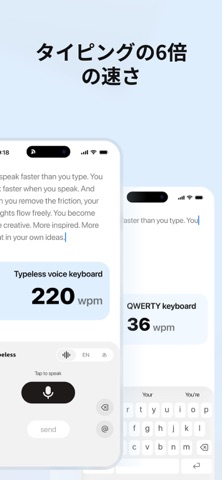
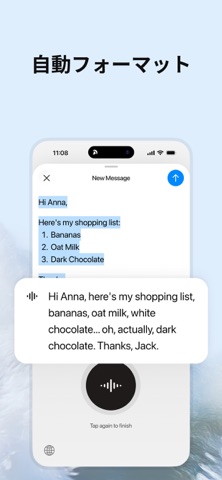
本当に賢いAI音声入力アプリが登場。自然に話すだけで、Typelessがあなたの言葉を、まるで丁寧にタイピングしたかのような洗練されたメッセージ、メール、ドキュメントにリアルタイムで変換します。タイピングの6倍の速さで入力可能です。 Typelessはあなたの声を最強のツールに変えます。これまでスマホでは不可能だと思われていた長文作成などが、10倍のスピードで、しかも手軽にできるようになります。 歩きながら、通勤中、あるいは小声で話すような場面でも、Typelessはあなたの言葉をクリアで洗練された文章に整えます。「えーっと」などのフィラー(言い淀み)や誤字脱字、不自然な言い回しは一切なし。あなたらしい、スムーズで流暢な文章だけが残ります。 文脈を理解する最先端の音声テキスト化AIを使えば、タイピングの煩わしさから解放され、思考が自由に溢れ出します。よりクリエイティブに、よりインスピレーション豊かに。まるで魔法のような体験です。 ビジネスリーダー、専門家、エンジニア、クリエイター、学生など、多くのプロフェッショナルが…
App details
What you can learn from Typeless: AI音声入力キーボード
Every shipping app on the App Store has gone through the same decisions you're working through right now: which screenshot goes first, what caption sits over it, which device frame to show, what color the background should be. The 7 screenshots above are Typeless: AI音声入力キーボード's answers to those questions — they're public, they're real, and they made it through Apple's review.
What the numbers say: Typeless: AI音声入力キーボード runs a light set with one background colour (#E4ECF4) carried across every screenshot — the listing reads as a single poster when the shots sit side by side in search results. The accent colour we picked up, #34CC5C, is the one to reuse for badges, arrows and highlighted words if you borrow this look. Hit Use this style to open the editor with these exact colours and drop your own screenshot in.
Notice the first screenshot in particular. It's the one users see in search results and on the product page, and it's where most apps spend their best caption and tightest design. Look at the proportion of background to phone, where the text sits, what one thing the image is trying to communicate.
Want to see how other Productivity apps approach the same problem? Browse more Productivity apps in the showcase.
Take what works into your own screenshots
Open LaunchShots and design your App Store & Google Play screenshots — pick a device frame, drop captions, ship in minutes. Free, in your browser.
Open the screenshot editor →Apps with a similar look
Closest background + accent colours among the listings we've analysed — useful when you want to see the same palette handled by a different team.