Screenshot changes — detected by LaunchShots
Screenshot style breakdown
Sampled from 6 of 蔵書マネージャー2(バーコード登録/フォルダ整理・新刊検索)'s App Store screenshots — background, accent and theme, measured by LaunchShots (not something Apple publishes).
#FCF4FC bg
#DDD6DD
#9C340C accent
#111111 text
Screenshots



Icon palette
About this app
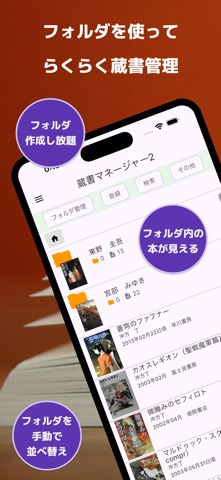
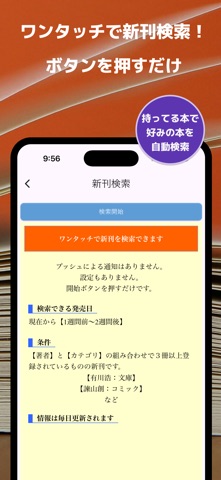
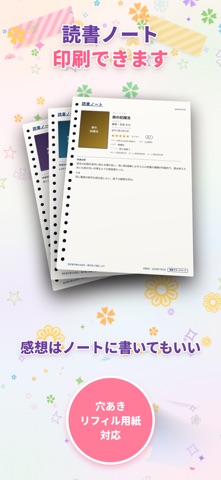
「蔵書マネージャー2」は、本や漫画をかんたん&美しく管理できる蔵書管理アプリです。 バーコード登録、ISBN自動認識、フォルダ整理、新刊チェック、本棚表示、グラフ表示、読書ノート印刷に対応。 本好き・漫画好きのあなたの「蔵書管理」「読書管理」をしっかりサポートします。 最近増えてきたバーコードの無い本も大丈夫! ISBNをカメラでサッと自動認識。もう手入力は不要です。 ● 高速読み取り (バーコード・ISBN) ピッとスキャンしてテンポよく、かんたん登録。 バーコードがない本も、ありそうでなかった独自のカメラ自動認識でISBNを読み取れます。 ● ありそうでなかった無制限フォルダで整理自在 フォルダはいくつでも作成可能。 サブフォルダや手動並べ替えにも対応し、思い通りの順番に整理できます。 ● 新刊検索に対応 あなたの本棚にある本をもとに、関連する新刊をワンボタンでかんたんチェック。 気になる1冊との出会いをサポートします。 ● キーワード検索(新刊) 好きな著者・出版社・シリーズ名などのキーワードを登録しておくだけで、該当…
App details
What you can learn from 蔵書マネージャー2(バーコード登録/フォルダ整理・新刊検索)
Every shipping app on the App Store has gone through the same decisions you're working through right now: which screenshot goes first, what caption sits over it, which device frame to show, what color the background should be. The 7 screenshots above are 蔵書マネージャー2(バーコード登録/フォルダ整理・新刊検索)'s answers to those questions — they're public, they're real, and they made it through Apple's review.
What the numbers say: 蔵書マネージャー2(バーコード登録/フォルダ整理・新刊検索) runs a mixed light-and-dark set where the background shifts from screenshot to screenshot (first shot #FCF4FC) — each image has to stand on its own, so the captions carry more of the story. The accent colour we picked up, #9C340C, is the one to reuse for badges, arrows and highlighted words if you borrow this look. Hit Use this style to open the editor with these exact colours and drop your own screenshot in.
Notice the first screenshot in particular. It's the one users see in search results and on the product page, and it's where most apps spend their best caption and tightest design. Look at the proportion of background to phone, where the text sits, what one thing the image is trying to communicate.
Want to see how other Book apps approach the same problem? Browse more Book apps in the showcase.
Take what works into your own screenshots
Open LaunchShots and design your App Store & Google Play screenshots — pick a device frame, drop captions, ship in minutes. Free, in your browser.
Open the screenshot editor →Apps with a similar look
Closest background + accent colours among the listings we've analysed — useful when you want to see the same palette handled by a different team.