Screenshot changes — detected by LaunchShots
Screenshot style breakdown
Sampled from 6 of 車旅コンシェルジュ - 駐車場・EV充電・温泉・道の駅検索's App Store screenshots — background, accent and theme, measured by LaunchShots (not something Apple publishes).
#FCF4EC bg
#DDD6CF
#84D4FC accent
#111111 text
Screenshots


Icon palette
About this app
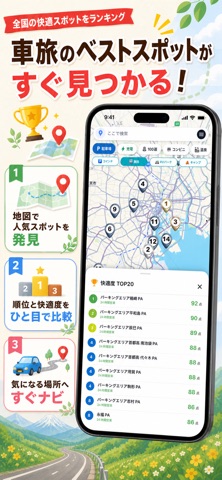
走るほど、日本が好きになる。 車旅コンシェルジュは、「今夜どこで休む?」「この駐車場はいくら?」「近くのEV充電器は?」「次はどこへ走る?」を一つの地図で解決する車旅アプリです。車中泊、キャンピングカー旅、EV旅行、週末ドライブまで、場所探し・料金比較・充電・旅の記録をまとめてサポートします。 【今夜の寝床・休憩場所を探す】 現在地や地図から、休憩・仮眠や車中泊の候補を探しやすくしました。道の駅、RVパーク、SA/PA、駐車場、温泉、公衆トイレ、コンビニなど、夜の車旅で確認したい場所を同じ地図で探せます。 【駐車場を検索・料金を比較】 全国10万件以上の駐車場を収録。現在地や目的地周辺からコインパーキングなどを検索し、利用予定時間に応じた駐車料金を比較できます。平面・立体・機械式、無料駐車場などの条件でも絞り込めます。 【EV充電スポットを探す・充電時間を計算】 急速充電・普通充電スポットを地図で検索。チャデモ、NACS、普通充電などを見分けやすく表示します。車種、現在のバッテリー残量、目標残量、充電器出力…
App details
What you can learn from 車旅コンシェルジュ - 駐車場・EV充電・温泉・道の駅検索
Every shipping app on the App Store has gone through the same decisions you're working through right now: which screenshot goes first, what caption sits over it, which device frame to show, what color the background should be. The 9 screenshots above are 車旅コンシェルジュ - 駐車場・EV充電・温泉・道の駅検索's answers to those questions — they're public, they're real, and they made it through Apple's review.
What the numbers say: 車旅コンシェルジュ - 駐車場・EV充電・温泉・道の駅検索 runs a light set with one background colour (#FCF4EC) carried across every screenshot — the listing reads as a single poster when the shots sit side by side in search results. The accent colour we picked up, #84D4FC, is the one to reuse for badges, arrows and highlighted words if you borrow this look. Hit Use this style to open the editor with these exact colours and drop your own screenshot in.
Notice the first screenshot in particular. It's the one users see in search results and on the product page, and it's where most apps spend their best caption and tightest design. Look at the proportion of background to phone, where the text sits, what one thing the image is trying to communicate.
Want to see how other Navigation apps approach the same problem? Browse more Navigation apps in the showcase.
Take what works into your own screenshots
Open LaunchShots and design your App Store & Google Play screenshots — pick a device frame, drop captions, ship in minutes. Free, in your browser.
Open the screenshot editor →Apps with a similar look
Closest background + accent colours among the listings we've analysed — useful when you want to see the same palette handled by a different team.