Chart position — tracked daily by LaunchShots
Screenshot changes — detected by LaunchShots
Screenshot style breakdown
Sampled from 6 of Chisme - Planes entre mujeres's App Store screenshots — background, accent and theme, measured by LaunchShots (not something Apple publishes).
#040404 bg
#272727
#8C6C54 accent
#FFFFFF text
Screenshots

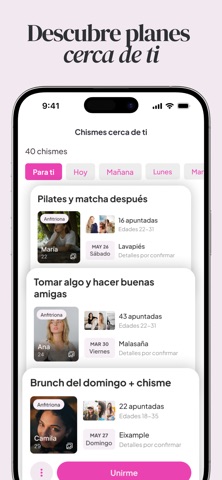

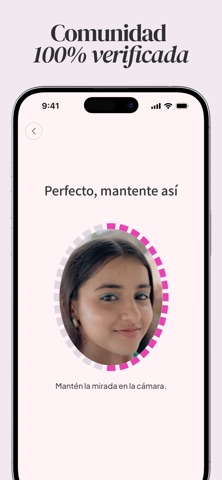


iPad screenshots


Icon palette
About this app
¿Cansada de chats eternos que nunca llegan a nada? Con Chisme los planes no se quedan en WhatsApp: se hacen realidad. Café, pilates, brunch o vinos — creas un plan, eliges fecha y lugar, y otras chicas se apuntan. Así de fácil. CÓMO FUNCIONA - Descubre planes cerca de ti y únete al instante. - ¿No encuentras tu plan? Créalo en 30 segundos y deja que otras se apunten. - Cada plan tiene su propio chat: nada de grupos infinitos, solo lo necesario para quedar. - Conoce a chicas con tus mismos intereses y con ganas reales de salir. UN ESPACIO SOLO PARA MUJERES, DE VERDAD - Todos los perfiles pasan verificación por selfie: detrás de cada plan hay personas reales. - Comunidad exclusiva de mujeres. Sin citas, sin presión, sin agendas ocultas. - Buen ambiente garantizado: reportar y bloquear es fácil, y actuamos rápido. CHISME EN NÚMEROS - Valoración de 4,7 con más de 1.000 valoraciones en el…
App details
What you can learn from Chisme - Planes entre mujeres
Every shipping app on the App Store has gone through the same decisions you're working through right now: which screenshot goes first, what caption sits over it, which device frame to show, what color the background should be. The 14 screenshots above are Chisme - Planes entre mujeres's answers to those questions — they're public, they're real, and they made it through Apple's review.
What the numbers say: Chisme - Planes entre mujeres runs a mixed light-and-dark set where the background shifts from screenshot to screenshot (first shot #040404) — each image has to stand on its own, so the captions carry more of the story. The accent colour we picked up, #8C6C54, is the one to reuse for badges, arrows and highlighted words if you borrow this look. Hit Use this style to open the editor with these exact colours and drop your own screenshot in.
Notice the first screenshot in particular. It's the one users see in search results and on the product page, and it's where most apps spend their best caption and tightest design. Look at the proportion of background to phone, where the text sits, what one thing the image is trying to communicate.
Want to see how other Social Networking apps approach the same problem? Browse more Social Networking apps in the showcase.
Take what works into your own screenshots
Open LaunchShots and design your App Store & Google Play screenshots — pick a device frame, drop captions, ship in minutes. Free, in your browser.
Open the screenshot editor →Apps with a similar look
Closest background + accent colours among the listings we've analysed — useful when you want to see the same palette handled by a different team.