Screenshot changes — detected by LaunchShots
Screenshot style breakdown
Sampled from 5 of カードキャプターさくら:思い出の鍵's App Store screenshots — background, accent and theme, measured by LaunchShots (not something Apple publishes).
#FCE4D4 bg
#DDC8BA
#CC7C8C accent
#111111 text
Screenshots

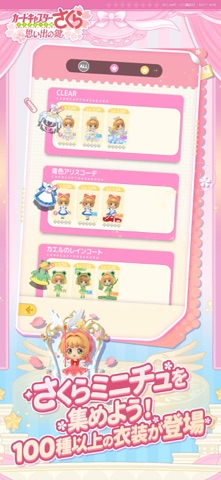


iPad screenshots


Icon palette
About this app
「絶対だいじょうぶだよ」。 その言葉は、今日もそばに。 『カードキャプターさくら』デジタルフィギュアコレクションがついに登場。 いつまでも色褪せないさくらちゃんとの思い出が、あなたの手のひらで、もう一度輝きはじめる。 【さくらちゃんの魅力が詰まったデジタルフィギュアコレクション】 さくらちゃん、ケロちゃん、知世ちゃん、小狼くん、桃矢くん… アニメ『カードキャプターさくら』のキャラクターたちがデジタルフィギュアで登場! きらめきいっぱいの“さくらの世界”を、あなたの手のひらで楽しもう。 【さくらミニチュをコレクション】 アニメで登場した衣装やゲーム限定ドレスなど、100種類以上の衣装を、デジタルフィギュア「さくらミニチュ」としてお届け。 ひとつひとつが、あなたとさくらちゃんの思い出をつなぐ“記憶の鍵”となる。 お気に入りのさくらミニチュで、あなただけの特別なステージを作ろう! 【グルメエリアで、甘いひとときを】 さくらミニチュたちと食材を調達し、レシピを研究して、とっておきの料理やスイーツを…
App details
What you can learn from カードキャプターさくら:思い出の鍵
Every shipping app on the App Store has gone through the same decisions you're working through right now: which screenshot goes first, what caption sits over it, which device frame to show, what color the background should be. The 10 screenshots above are カードキャプターさくら:思い出の鍵's answers to those questions — they're public, they're real, and they made it through Apple's review.
What the numbers say: カードキャプターさくら:思い出の鍵 runs a light set where the background shifts from screenshot to screenshot (first shot #FCE4D4) — each image has to stand on its own, so the captions carry more of the story. The accent colour we picked up, #CC7C8C, is the one to reuse for badges, arrows and highlighted words if you borrow this look. Hit Use this style to open the editor with these exact colours and drop your own screenshot in.
Notice the first screenshot in particular. It's the one users see in search results and on the product page, and it's where most apps spend their best caption and tightest design. Look at the proportion of background to phone, where the text sits, what one thing the image is trying to communicate.
Want to see how other Games apps approach the same problem? Browse more Games apps in the showcase.
Take what works into your own screenshots
Open LaunchShots and design your App Store & Google Play screenshots — pick a device frame, drop captions, ship in minutes. Free, in your browser.
Open the screenshot editor →Apps with a similar look
Closest background + accent colours among the listings we've analysed — useful when you want to see the same palette handled by a different team.