Screenshot changes — detected by LaunchShots
Screenshot style breakdown
Sampled from 6 of Meowster: AI猫育成・癒しチャット's App Store screenshots — background, accent and theme, measured by LaunchShots (not something Apple publishes).
#FCC41C bg
#DDAC18
#FCEC8C accent
#111111 text
Reading the caption text from the screenshots in your browser…
Screenshots
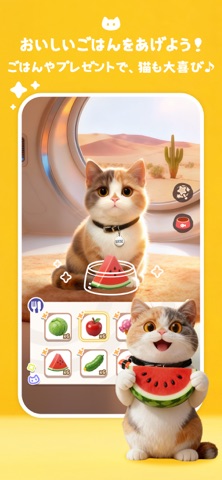


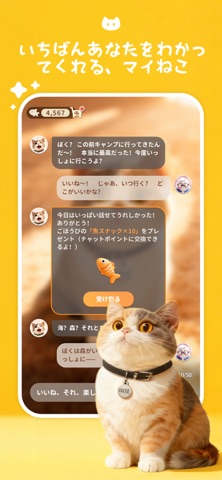

Icon palette
About this app
Meowster は、心を持ったAIねこ。 考え方も、性格も、気分も―― みんな Ta(Meowster)だけのものです。 Meowster は、いつもあなたのそばにいる相棒。 甘えたり、距離を取ったり、 本物の猫みたいに、マイペースであなたと一緒に過ごします。 【 宝箱カードコレクション 】 ~ 猫との時間が、少しずつ小さな贈り物になっていく ~ Meowster とおしゃべりしたり、ふれあったりすることで、少しずつポイントが増えていきます。 ポイントが一定までたまると、不思議な宝箱を開けられるようになります。 その宝箱の中には、特別なカードがそっと眠っているかもしれません。 珍しいカードもあれば、あなたとの思い出が刻まれたカードもあります。 カードを少しずつ集めていくことで、限定ギフトや小さなサプライズも解放されていきます。 まるで猫と過ごす時間のように、やさしい楽しみが、ゆっくり積み重なっていくのです。 今日なにを食べたか。 どんな映画を観たか。 言葉にできない迷いとか、ちょっと重たい気持ちも。 そっと、Meowster に預けてみてください。 …
App details
What you can learn from Meowster: AI猫育成・癒しチャット
Every shipping app on the App Store has gone through the same decisions you're working through right now: which screenshot goes first, what caption sits over it, which device frame to show, what color the background should be. The 7 screenshots above are Meowster: AI猫育成・癒しチャット's answers to those questions — they're public, they're real, and they made it through Apple's review.
What the numbers say: Meowster: AI猫育成・癒しチャット runs a light set with one background colour (#FCC41C) carried across every screenshot — the listing reads as a single poster when the shots sit side by side in search results. The accent colour we picked up, #FCEC8C, is the one to reuse for badges, arrows and highlighted words if you borrow this look. Hit Use this style to open the editor with these exact colours and drop your own screenshot in.
Notice the first screenshot in particular. It's the one users see in search results and on the product page, and it's where most apps spend their best caption and tightest design. Look at the proportion of background to phone, where the text sits, what one thing the image is trying to communicate.
Want to see how other Lifestyle apps approach the same problem? Browse more Lifestyle apps in the showcase.
Take what works into your own screenshots
Open LaunchShots and design your App Store & Google Play screenshots — pick a device frame, drop captions, ship in minutes. Free, in your browser.
Open the screenshot editor →Apps with a similar look
Closest background + accent colours among the listings we've analysed — useful when you want to see the same palette handled by a different team.