Screenshot style breakdown
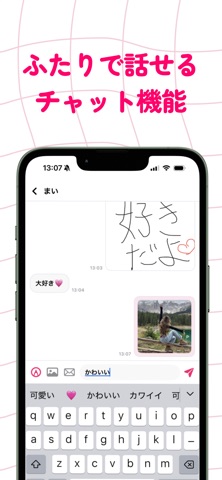
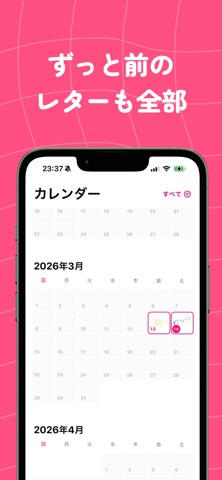
Sampled from 5 of loveU(ラブユー)'s App Store screenshots — background, accent and theme, measured by LaunchShots (not something Apple publishes).
#FC4C84 bg
#FC6595
#847C54 accent
#FFFFFF text
Screenshots


Icon palette
About this app
loveU ― “手書きで気持ちを伝える”ふたり専用レターアプリ loveU は、ふたりだけの手書きレターを毎日送り合えるコミュニケーションアプリ。 スマホで描いた小さなキャンバスと一言メッセージが、その日の気持ちをまるごと保存してくれます。 描いたレターは、タイムラインとホーム画面ウィジェットに自動で反映。 通知を開かなくても、相手からの最新レターがふとした瞬間に目に入って、 「今、こう思ってくれてるんだ」ってすぐ分かる。 レターはあとから並べ替えたり保存したりできて、 手書きの温度感そのままにふたりの思い出が積み上がっていく“アルバム”みたいな存在に。 プレミアムプランについて 無料でも 1日1通のレター交換が楽しめます。 「まずはお試しで毎日送り合いたい」って人はそのままでOK。 もっと自由に使いたい人には、 プレミアム(月¥500 / 年¥5,000)がおすすめ。 ふたりの“毎日”をもっと軽く、もっと自由に 決済は App Store 経由で安全。 あなたのサポートは、今後の新機能開発やアプリ改善に直接つながります。 利用規約とプライ…
App details
What you can learn from loveU(ラブユー)
Every shipping app on the App Store has gone through the same decisions you're working through right now: which screenshot goes first, what caption sits over it, which device frame to show, what color the background should be. The 5 screenshots above are loveU(ラブユー)'s answers to those questions — they're public, they're real, and they made it through Apple's review.
What the numbers say: loveU(ラブユー) runs a mixed light-and-dark set where the background shifts from screenshot to screenshot (first shot #FC4C84) — each image has to stand on its own, so the captions carry more of the story. The accent colour we picked up, #847C54, is the one to reuse for badges, arrows and highlighted words if you borrow this look. Hit Use this style to open the editor with these exact colours and drop your own screenshot in.
Notice the first screenshot in particular. It's the one users see in search results and on the product page, and it's where most apps spend their best caption and tightest design. Look at the proportion of background to phone, where the text sits, what one thing the image is trying to communicate.
Want to see how other Social Networking apps approach the same problem? Browse more Social Networking apps in the showcase.
Take what works into your own screenshots
Open LaunchShots and design your App Store & Google Play screenshots — pick a device frame, drop captions, ship in minutes. Free, in your browser.
Open the screenshot editor →Apps with a similar look
Closest background + accent colours among the listings we've analysed — useful when you want to see the same palette handled by a different team.