Chart position — tracked daily by LaunchShots
Screenshot style breakdown
Sampled from 4 of MAISEAT: 买全球演出,就上MAISEAT!'s App Store screenshots — background, accent and theme, measured by LaunchShots (not something Apple publishes).
#FC4C64 bg
#FC6579
#B43C1C accent
#FFFFFF text
Screenshots

Icon palette
About this app
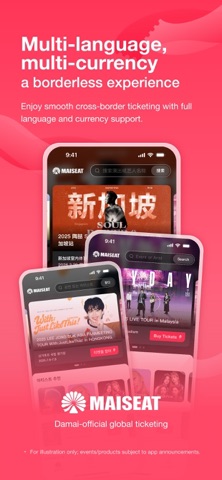
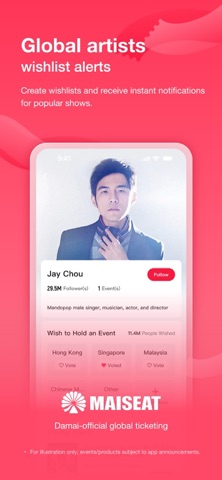
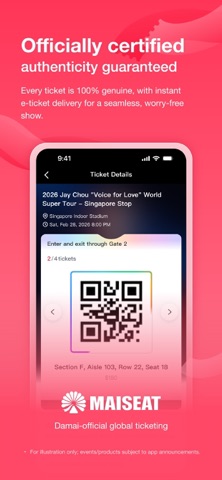
MAISEAT:大麦官方全球票务平台 畅游世界舞台,从一张票开始。 MAISEAT大麦国际——汇聚全球演出,多语言多币种便捷购票,许愿提醒快人一步,官方票源安心保障。让热爱,不再遥远。 【全球演出 一触即达】 汇聚全球顶尖演唱会、音乐节、体育赛事与剧场,一键购票,世界舞台尽在掌心 【多语言多币种 无界体验】 支持中英日韩等语言及多国货币,跨境购票如本地般简单便捷 【全球艺人 抢先许愿】 设置心愿单,开票提醒精准推送,热门演出快人一步 【官方认证 安心保障】 100%真票保障,电子票即时出票,全程无忧观演
App details
What you can learn from MAISEAT: 买全球演出,就上MAISEAT!
Every shipping app on the App Store has gone through the same decisions you're working through right now: which screenshot goes first, what caption sits over it, which device frame to show, what color the background should be. The 4 screenshots above are MAISEAT: 买全球演出,就上MAISEAT!'s answers to those questions — they're public, they're real, and they made it through Apple's review.
What the numbers say: MAISEAT: 买全球演出,就上MAISEAT! runs a dark set with one background colour (#FC4C64) carried across every screenshot — the listing reads as a single poster when the shots sit side by side in search results. The accent colour we picked up, #B43C1C, is the one to reuse for badges, arrows and highlighted words if you borrow this look. Hit Use this style to open the editor with these exact colours and drop your own screenshot in.
Notice the first screenshot in particular. It's the one users see in search results and on the product page, and it's where most apps spend their best caption and tightest design. Look at the proportion of background to phone, where the text sits, what one thing the image is trying to communicate.
Want to see how other Entertainment apps approach the same problem? Browse more Entertainment apps in the showcase.
Take what works into your own screenshots
Open LaunchShots and design your App Store & Google Play screenshots — pick a device frame, drop captions, ship in minutes. Free, in your browser.
Open the screenshot editor →Apps with a similar look
Closest background + accent colours among the listings we've analysed — useful when you want to see the same palette handled by a different team.