Chart position — tracked daily by LaunchShots
Screenshot changes — detected by LaunchShots
Screenshot style breakdown
Sampled from 6 of StudyLive | オンライン自習室で勉強記録・勉強集中's App Store screenshots — background, accent and theme, measured by LaunchShots (not something Apple publishes).
#3434DC bg
#5050E0
#34DC84 accent
#FFFFFF text
Screenshots


iPad screenshots


Icon palette
About this app
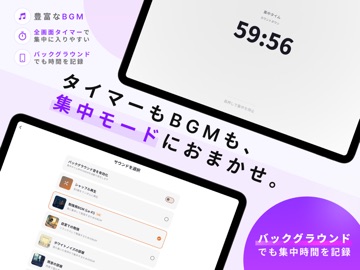
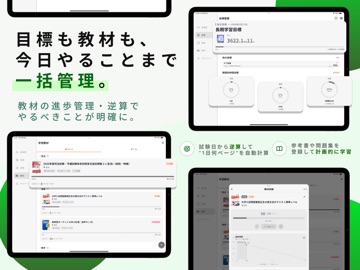
StudyLive(スタディライブ) - 学習を習慣化する「オンライン自習室」アプリ 「ひとりじゃ続かない」「勉強のモチベーションが保てない」 そんな悩みを解決する、新しい学習管理アプリ。 StudyLiveは、オンライン自習室で仲間と繋がり、ランキングで競い合い、目標達成の喜びを共有できる学習プラットフォームです。学習を「孤独な作業」から「楽しい習慣」へと変革します。 【主な機能】 ■ オンライン自習室 リアルタイムで他のユーザーと一緒に学習できる仮想自習室。 ・アバター表示で気軽に参加 ・同じ空間で学習する仲間の存在を感じられる ・コメント機能で励まし合える ・図書館や自習室にいるような適度な緊張感 一人では挫折しがちな学習も、仲間と一緒なら続けられます。 ■ 学習タイマー & 記録 科目別に学習時間を自動記録。 ・ポモドーロテクニック対応で集中力UP ・科目ごとの学習時間を自動集計 ・日次・週次・月次で学習データを可視化 ・学習傾向を分析して効率的な学習をサポート あなたの努力を、すべて記録します。 ■ 教材管理 & 進捗追跡 参…
App details
What you can learn from StudyLive | オンライン自習室で勉強記録・勉強集中
Every shipping app on the App Store has gone through the same decisions you're working through right now: which screenshot goes first, what caption sits over it, which device frame to show, what color the background should be. The 11 screenshots above are StudyLive | オンライン自習室で勉強記録・勉強集中's answers to those questions — they're public, they're real, and they made it through Apple's review.
What the numbers say: StudyLive | オンライン自習室で勉強記録・勉強集中 runs a dark set where the background shifts from screenshot to screenshot (first shot #3434DC) — each image has to stand on its own, so the captions carry more of the story. The accent colour we picked up, #34DC84, is the one to reuse for badges, arrows and highlighted words if you borrow this look. Hit Use this style to open the editor with these exact colours and drop your own screenshot in.
Notice the first screenshot in particular. It's the one users see in search results and on the product page, and it's where most apps spend their best caption and tightest design. Look at the proportion of background to phone, where the text sits, what one thing the image is trying to communicate.
Want to see how other Education apps approach the same problem? Browse more Education apps in the showcase.
Take what works into your own screenshots
Open LaunchShots and design your App Store & Google Play screenshots — pick a device frame, drop captions, ship in minutes. Free, in your browser.
Open the screenshot editor →Apps with a similar look
Closest background + accent colours among the listings we've analysed — useful when you want to see the same palette handled by a different team.