Chart position — tracked daily by LaunchShots
Screenshot changes — detected by LaunchShots
Screenshot style breakdown
Sampled from 4 of 三维山水全景地图's App Store screenshots — background, accent and theme, measured by LaunchShots (not something Apple publishes).
#FCFCFC bg
#DDDDDD
#2C5424 accent
#111111 text
Screenshots
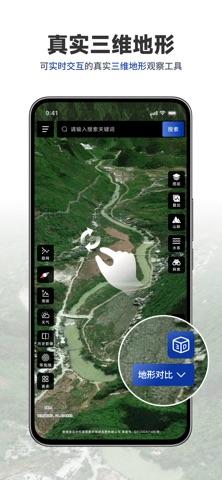

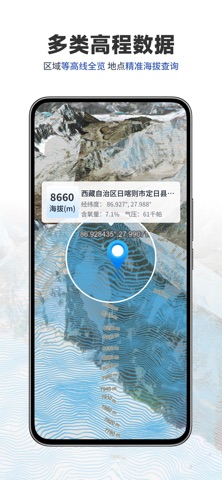

iPad screenshots


Icon palette
About this app
三维山水全景地图,是一款可实时交互的真实三维地形观察工具。只需指尖轻滑旋转、缩放,就能以 3D 视角直观掌握山脉走势、水系分布与坡向高差 —— 即便足不出户,也能轻松洞悉山水间的每一处细节。同时,还整合了多类地图图源、多种实用地图工具及海量地图数据,全方位为便捷使用提供有力支持,让地理观察与分析更高效、更轻松。 会员服务以及自动订阅说明 1.订阅服务:三维山水全景地图会员月卡订阅(1个月),三维山水全景地图会员年卡订阅(12个月) 2.订阅价格:月卡订阅产品为68元/月,年卡订阅产品为128/年 3.购买价格:终身会员产品为198元 4.付款:用户确认购买并付款后计入iTunes账户 5.苹果iTunes账户会在到期前24小时内扣费,扣费成功后订阅周期顺延一个订阅周期 6.如果取消订阅,请打开苹果手机“设置” —进入“iTunes Store 与 App Store” —点击“ App ID” 选择“查看Apple ID” ,进入“账户设置”页面,点击“订阅”,选择三维山水全景地图取消订阅,如未在订阅期结束的至少24小时前关闭订阅,此订阅将会自动续订 用户协议 :https://agreement.yuan9.cn/agreement/…
App details
What you can learn from 三维山水全景地图
Every shipping app on the App Store has gone through the same decisions you're working through right now: which screenshot goes first, what caption sits over it, which device frame to show, what color the background should be. The 8 screenshots above are 三维山水全景地图's answers to those questions — they're public, they're real, and they made it through Apple's review.
What the numbers say: 三维山水全景地图 runs a light set with one background colour (#FCFCFC) carried across every screenshot — the listing reads as a single poster when the shots sit side by side in search results. The accent colour we picked up, #2C5424, is the one to reuse for badges, arrows and highlighted words if you borrow this look. Hit Use this style to open the editor with these exact colours and drop your own screenshot in.
Notice the first screenshot in particular. It's the one users see in search results and on the product page, and it's where most apps spend their best caption and tightest design. Look at the proportion of background to phone, where the text sits, what one thing the image is trying to communicate.
Want to see how other Navigation apps approach the same problem? Browse more Navigation apps in the showcase.
Take what works into your own screenshots
Open LaunchShots and design your App Store & Google Play screenshots — pick a device frame, drop captions, ship in minutes. Free, in your browser.
Open the screenshot editor →Apps with a similar look
Closest background + accent colours among the listings we've analysed — useful when you want to see the same palette handled by a different team.