Chart position — tracked daily by LaunchShots
Screenshot style breakdown
Sampled from 4 of dバリューパス(旧スゴ得コンテンツ)'s App Store screenshots — background, accent and theme, measured by LaunchShots (not something Apple publishes).
#FCF4F4 bg
#DDD6D6
#EC3C5C accent
#111111 text
Screenshots


iPad screenshots


Icon palette
About this app
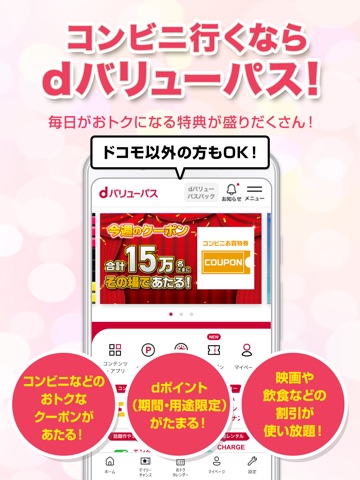
ドコモ以外の方も使える! コンビニ行くならdバリューパス!毎日がおトクになる特典盛りだくさん。コンビニなどで使えるクーポンや豪華賞品が当たる!dポイント(期間・用途限定)がたまる! 【Point1】コンビニでおトク ●コンビニの100円お買い物券などのクーポンが毎週15万名※にあたる抽選に毎日参加可能! ハズレなしでdポイント(期間・用途限定)が最大1,500ptあたる抽選にも毎日参加できる! 毎週金曜は豪華商品が10万名にあたるW抽選も開催。 ※週によって当選変数が変動する場合があります ●全国のコンビニや施設にあるモバイルバッテリーレンタル「CHARGESPOT」がいつでも・何度でも・何時間でも使い放題! 【Point2】dポイント(期間・用途限定)がたまっておトク ●エントリーしてから街のお店で200円(税込)以上d払い決済すると、決済のたびにハズレ無し抽選でdポイント(期間・用途限定)がもらえる!最大全額還元のチャンス!(還元上限700pt) ※一部対象外の加盟店、支払方法、決済があります ●使うだけでdポイント(期間・用途限定)がたまるコン…
App details
What you can learn from dバリューパス(旧スゴ得コンテンツ)
Every shipping app on the App Store has gone through the same decisions you're working through right now: which screenshot goes first, what caption sits over it, which device frame to show, what color the background should be. The 8 screenshots above are dバリューパス(旧スゴ得コンテンツ)'s answers to those questions — they're public, they're real, and they made it through Apple's review.
What the numbers say: dバリューパス(旧スゴ得コンテンツ) runs a light set with one background colour (#FCF4F4) carried across every screenshot — the listing reads as a single poster when the shots sit side by side in search results. The accent colour we picked up, #EC3C5C, is the one to reuse for badges, arrows and highlighted words if you borrow this look. Hit Use this style to open the editor with these exact colours and drop your own screenshot in.
Notice the first screenshot in particular. It's the one users see in search results and on the product page, and it's where most apps spend their best caption and tightest design. Look at the proportion of background to phone, where the text sits, what one thing the image is trying to communicate.
Want to see how other Entertainment apps approach the same problem? Browse more Entertainment apps in the showcase.
Take what works into your own screenshots
Open LaunchShots and design your App Store & Google Play screenshots — pick a device frame, drop captions, ship in minutes. Free, in your browser.
Open the screenshot editor →Apps with a similar look
Closest background + accent colours among the listings we've analysed — useful when you want to see the same palette handled by a different team.