Chart position — tracked daily by LaunchShots
Screenshot style breakdown
Sampled from 4 of 发车格·F1车迷必备的赛程助手's App Store screenshots — background, accent and theme, measured by LaunchShots (not something Apple publishes).
#340C14 bg
#502E34
#B41434 accent
#FFFFFF text
Screenshots


iPad screenshots


Icon palette
About this app
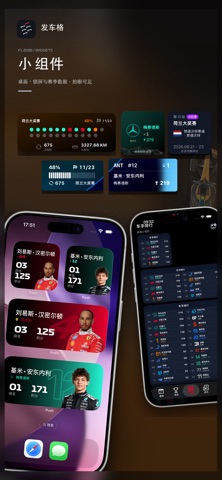
原F1Push App,我们更名为发车格啦!!! 发车格专为 F1 爱好者打造,让你随时掌握赛程与积分排名,绝不错过任何精彩比赛! 核心功能: ·赛程提醒:精准推送每场比赛时间,可一键加入日历,赛前提醒,准时观赛无压力。 ·实时排名:随时查看车手和车队积分榜,赛季积分变化一目了然。 ·关注车手/车队:优先获取你喜爱的车手或车队排名更新。 ·小组件支持:在主屏幕直观查看赛程和排名,快速掌握最新信息。 ·个性化主题:选择喜爱的车队后,App 主体颜色自动切换为该车队主题色,打造专属 F1 体验。 ·简洁界面:操作流畅,赛程与排名一屏掌握,极速追踪赛场动态。 无论你是资深 F1 粉丝还是新入坑的赛迷,F1 Push 都是你的贴身赛事助手。 立即下载,开启专属你的 F1 极速体验! 自动续费订阅说明 本应用提供以下自动续费订阅服务: • 年订阅会员:¥128/年 • 月订阅会员:¥25/月 • 周订阅会员:¥6/周 付款将在用户确认购买时从 Apple ID 账户扣除。 订阅将自动续费,除非在当前订阅周期结束前至少 24 小时关闭自动续费。 账户将在当前周期结束前 24 小时内收取续…
App details
What you can learn from 发车格·F1车迷必备的赛程助手
Every shipping app on the App Store has gone through the same decisions you're working through right now: which screenshot goes first, what caption sits over it, which device frame to show, what color the background should be. The 8 screenshots above are 发车格·F1车迷必备的赛程助手's answers to those questions — they're public, they're real, and they made it through Apple's review.
What the numbers say: 发车格·F1车迷必备的赛程助手 runs a dark set where the background shifts from screenshot to screenshot (first shot #340C14) — each image has to stand on its own, so the captions carry more of the story. The accent colour we picked up, #B41434, is the one to reuse for badges, arrows and highlighted words if you borrow this look. Hit Use this style to open the editor with these exact colours and drop your own screenshot in.
Notice the first screenshot in particular. It's the one users see in search results and on the product page, and it's where most apps spend their best caption and tightest design. Look at the proportion of background to phone, where the text sits, what one thing the image is trying to communicate.
Want to see how other Sports apps approach the same problem? Browse more Sports apps in the showcase.
Take what works into your own screenshots
Open LaunchShots and design your App Store & Google Play screenshots — pick a device frame, drop captions, ship in minutes. Free, in your browser.
Open the screenshot editor →Apps with a similar look
Closest background + accent colours among the listings we've analysed — useful when you want to see the same palette handled by a different team.