Chart position — tracked daily by LaunchShots
Screenshot style breakdown
Sampled from 5 of 慧问八斗-古典文化学习打卡's App Store screenshots — background, accent and theme, measured by LaunchShots (not something Apple publishes).
#F4540C bg
#F56B2E
#F4C49C accent
#FFFFFF text
Screenshots



Icon palette
About this app
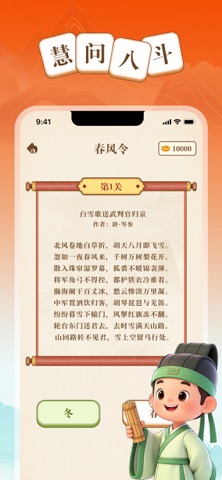
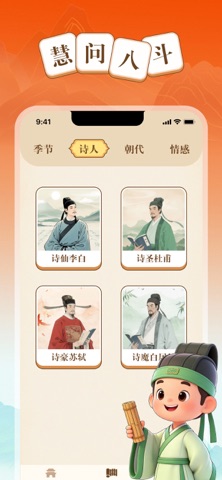
《春风令》以季节为令,带你漫步唐宋诗人的四时光景: 春:一夜春风来,千树万树梨花开 夏:接天莲叶无穷碧 秋:停车坐爱枫林晚 冬:北风卷地白草折 经典诗句化作互动关卡,猜字、判断、填空,在「得之!」与「惜乎~」之间,不知不觉记住更多好诗。 核心特色 原创季节诗词闯关体系 按季节·诗人·朝代·情感多维度诗词库 每日打卡 · 成就解锁 · 轻量知识积累 诗通江海 · 词越春秋,遇见更好的自己 无论你是准备诗词大会、想陪孩子亲近国学,还是单纯喜欢古风文艺,这里都有一首诗,在等你。 下载慧问八斗,让我们一起 在春风里相遇李白 在秋水中重逢苏轼 在雪夜里听见岑参
App details
What you can learn from 慧问八斗-古典文化学习打卡
Every shipping app on the App Store has gone through the same decisions you're working through right now: which screenshot goes first, what caption sits over it, which device frame to show, what color the background should be. The 5 screenshots above are 慧问八斗-古典文化学习打卡's answers to those questions — they're public, they're real, and they made it through Apple's review.
What the numbers say: 慧问八斗-古典文化学习打卡 runs a dark set with one background colour (#F4540C) carried across every screenshot — the listing reads as a single poster when the shots sit side by side in search results. The accent colour we picked up, #F4C49C, is the one to reuse for badges, arrows and highlighted words if you borrow this look. Hit Use this style to open the editor with these exact colours and drop your own screenshot in.
Notice the first screenshot in particular. It's the one users see in search results and on the product page, and it's where most apps spend their best caption and tightest design. Look at the proportion of background to phone, where the text sits, what one thing the image is trying to communicate.
Want to see how other Reference apps approach the same problem? Browse more Reference apps in the showcase.
Take what works into your own screenshots
Open LaunchShots and design your App Store & Google Play screenshots — pick a device frame, drop captions, ship in minutes. Free, in your browser.
Open the screenshot editor →Apps with a similar look
Closest background + accent colours among the listings we've analysed — useful when you want to see the same palette handled by a different team.