Chart position — tracked daily by LaunchShots
Screenshot changes — detected by LaunchShots
Screenshot style breakdown
Sampled from 6 of 阪神タイガース公式アプリ's App Store screenshots — background, accent and theme, measured by LaunchShots (not something Apple publishes).
#FCDC14 bg
#DDC111
#643C2C accent
#111111 text
Screenshots




Icon palette
About this app
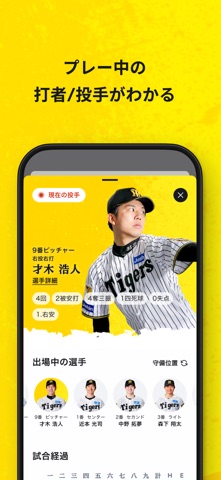
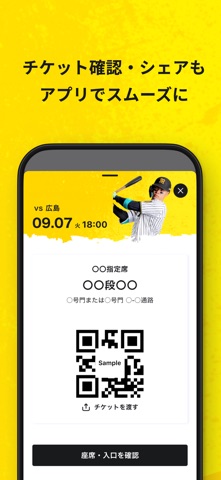
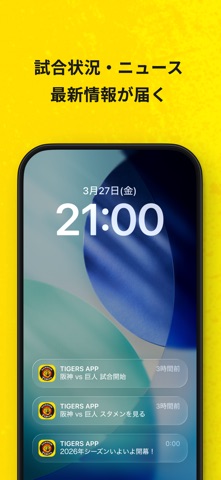
阪神タイガースの熱狂を、いつでもどこでもあなたのスマホに! 試合速報から電子チケット、チームの最新ニュースやファンクラブ会員証まで、タイガースライフがこれひとつでもっと便利に、 球場での観戦も快適にもっと楽しくなります! タイガースをもっと身近に感じる、ファン必携の公式アプリです。 <主な機能> ◯ 試合日程・詳細 試合予定から試合結果、各試合の詳細情報をアプリを開くだけですぐに確認できます。また、球場マップや施設案内も充実しているので、現地での観戦もこれさえあれば迷わず安心です。 ◯ リアルタイム試合速報 試合中の打者・投手情報をリアルタイムでお届け。出場選手や試合経過を詳しく追いかけられるので、熱狂の瞬間を逃しません。 ◯ チケット アプリでチケットを表示して、QRコードでそのまま入場!QRコードでスムーズに入場できるほか、家族・友だちへのチケットシェアも簡単。 ◯ チーム情報 最新の順位表や成績をいつでもチェック。チームや選手の応援歌もすぐに見られるので、どこにいても全力で応援する準備はバッチリです…
App details
What you can learn from 阪神タイガース公式アプリ
Every shipping app on the App Store has gone through the same decisions you're working through right now: which screenshot goes first, what caption sits over it, which device frame to show, what color the background should be. The 8 screenshots above are 阪神タイガース公式アプリ's answers to those questions — they're public, they're real, and they made it through Apple's review.
What the numbers say: 阪神タイガース公式アプリ runs a light set where the background shifts from screenshot to screenshot (first shot #FCDC14) — each image has to stand on its own, so the captions carry more of the story. The accent colour we picked up, #643C2C, is the one to reuse for badges, arrows and highlighted words if you borrow this look. Hit Use this style to open the editor with these exact colours and drop your own screenshot in.
Notice the first screenshot in particular. It's the one users see in search results and on the product page, and it's where most apps spend their best caption and tightest design. Look at the proportion of background to phone, where the text sits, what one thing the image is trying to communicate.
Want to see how other Sports apps approach the same problem? Browse more Sports apps in the showcase.
Take what works into your own screenshots
Open LaunchShots and design your App Store & Google Play screenshots — pick a device frame, drop captions, ship in minutes. Free, in your browser.
Open the screenshot editor →Apps with a similar look
Closest background + accent colours among the listings we've analysed — useful when you want to see the same palette handled by a different team.