Screenshot changes — detected by LaunchShots
Screenshot style breakdown
Sampled from 4 of Shinobi Term's App Store screenshots — background, accent and theme, measured by LaunchShots (not something Apple publishes).
#0C0C0C bg
#2E2E2E
#24BC5C accent
#FFFFFF text
Reading the caption text from the screenshots in your browser…
Screenshots


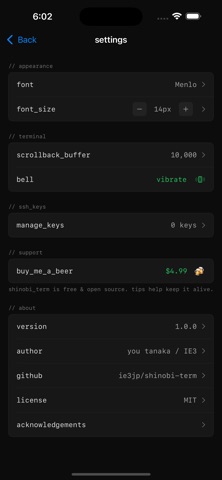
iPad screenshots


Icon palette
About this app
iPhone から Claude Code を使う最短経路。 Shinobi Term は、無料・オープンソースの iOS SSH ターミナルクライアントです。Mac の tmux セッションにワンタップで接続し、Claude Code での開発をどこからでも。 特長 - tmux ワンタップ attach: アクティブなセッション一覧から即接続 - Claude Code 対応: tmux 上の Claude Code と自然言語で開発 - CJK 完全対応: 日本語・中国語・韓国語が正しく表示 - SSH 鍵認証: Ed25519 鍵をデバイス上で生成、秘密鍵は Keychain に安全保管 - 拡張キーボード: Ctrl, Alt, Esc, Tab, 矢印キー - スクロールモード: スワイプで tmux の出力履歴を閲覧 - 無料・OSS: 広告なし、トラッキングなし、アカウント不要 おすすめ構成 iPhone + Tailscale + ShinobiTerm → Mac の tmux → Claude Code Tailscale を Mac と iPhone にインストールすれば、外出先からでも SSH 接続可能。tmux セッションを作り、Claude Code を起動したら、iPhone からワンタップで接続。 プライバシー 認証情報は iOS Keychain にのみ保存。外部サー…
App details
What you can learn from Shinobi Term
Every shipping app on the App Store has gone through the same decisions you're working through right now: which screenshot goes first, what caption sits over it, which device frame to show, what color the background should be. The 7 screenshots above are Shinobi Term's answers to those questions — they're public, they're real, and they made it through Apple's review.
What the numbers say: Shinobi Term runs a dark set with one background colour (#0C0C0C) carried across every screenshot — the listing reads as a single poster when the shots sit side by side in search results. The accent colour we picked up, #24BC5C, is the one to reuse for badges, arrows and highlighted words if you borrow this look. Hit Use this style to open the editor with these exact colours and drop your own screenshot in.
Notice the first screenshot in particular. It's the one users see in search results and on the product page, and it's where most apps spend their best caption and tightest design. Look at the proportion of background to phone, where the text sits, what one thing the image is trying to communicate.
Want to see how other Developer Tools apps approach the same problem? Browse more Developer Tools apps in the showcase.
Take what works into your own screenshots
Open LaunchShots and design your App Store & Google Play screenshots — pick a device frame, drop captions, ship in minutes. Free, in your browser.
Open the screenshot editor →Apps with a similar look
Closest background + accent colours among the listings we've analysed — useful when you want to see the same palette handled by a different team.