Chart position — tracked daily by LaunchShots
Screenshot changes — detected by LaunchShots
Screenshot style breakdown
Sampled from 6 of Dialect : apprends ta langue's App Store screenshots — background, accent and theme, measured by LaunchShots (not something Apple publishes).
#7C8C4C bg
#8E9C65
#E4CC84 accent
#FFFFFF text
Screenshots


iPad screenshots
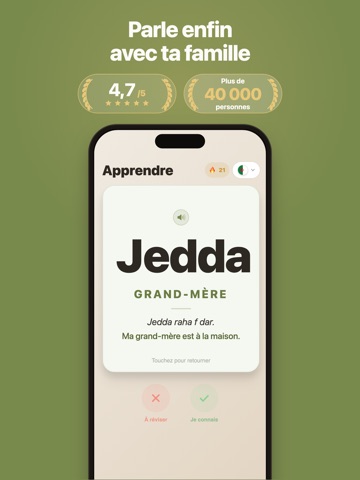
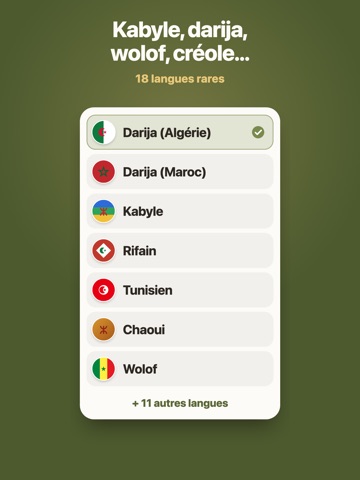


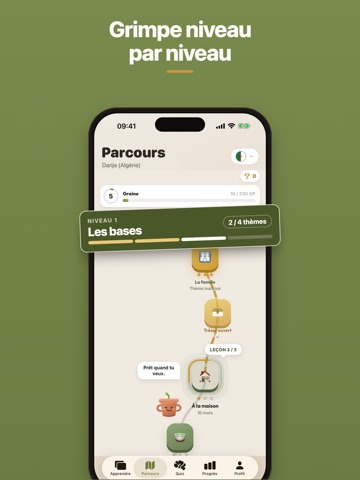


Icon palette
About this app
Tu sais comment dire "je t'aime" à ta grand-mère dans sa langue ? Si tu es né loin de tes origines, tu connais ce sentiment : tu souris quand ta famille parle entre elle... mais tu ne peux pas vraiment répondre. Ce fossé-là, Dialect est là pour le combler. LA PREMIÈRE APP POUR TES LANGUES FAMILIALES Kabyle, Darija algérien ou marocain, Wolof, Peul, Créole... Ces langues que les écoles n'enseignent jamais, celles que l'on apprend normalement autour d'une table de famille. Dialect est la seule app construite pour elles. LA VRAIE PRONONCIATION Chaque mot est prononcé par un locuteur natif*. Tu entends la vraie musique de la langue, pas une voix froide générée par ordinateur. 5 MINUTES PAR JOUR. DES RÉSULTATS EN 30 JOURS. Notre système de répétition espacée, prouvé scientifiquement, adapte chaque session à ce que tu as déjà mémorisé. Tu retiens plus, tu oublies moins. Même a…
App details
What you can learn from Dialect : apprends ta langue
Every shipping app on the App Store has gone through the same decisions you're working through right now: which screenshot goes first, what caption sits over it, which device frame to show, what color the background should be. The 16 screenshots above are Dialect : apprends ta langue's answers to those questions — they're public, they're real, and they made it through Apple's review.
What the numbers say: Dialect : apprends ta langue runs a mixed light-and-dark set where the background shifts from screenshot to screenshot (first shot #7C8C4C) — each image has to stand on its own, so the captions carry more of the story. The accent colour we picked up, #E4CC84, is the one to reuse for badges, arrows and highlighted words if you borrow this look. Hit Use this style to open the editor with these exact colours and drop your own screenshot in.
Notice the first screenshot in particular. It's the one users see in search results and on the product page, and it's where most apps spend their best caption and tightest design. Look at the proportion of background to phone, where the text sits, what one thing the image is trying to communicate.
Want to see how other Education apps approach the same problem? Browse more Education apps in the showcase.
Take what works into your own screenshots
Open LaunchShots and design your App Store & Google Play screenshots — pick a device frame, drop captions, ship in minutes. Free, in your browser.
Open the screenshot editor →Apps with a similar look
Closest background + accent colours among the listings we've analysed — useful when you want to see the same palette handled by a different team.