launchshots / showcase / navigation / odo: speedometer, drive & ride

Odo: Speedometer, Drive & Ride

by Taohidul Islam
Navigation ★ 5.0 (8) Free 4+ 100 MB

Chart position — tracked daily by LaunchShots

#32 of 100
Top Free Navigation · Philippines
best #32 · 2 days tracked · as of Oct 4
— / 7d
#53 of 100
Top Free Navigation · UAE
best #53 · 2 days tracked · as of Oct 7
▲ 31 / 7d
#67 of 100
Top Free Navigation · Turkey
best #67 · 1 day tracked · as of Oct 8
#78 of 100
Top Free Navigation · Saudi Arabia
best #78 · 1 day tracked · as of Sep 26
— / 7d

Screenshot changes — detected by LaunchShots

Oct 10, 2026
Odo: Speedometer, Drive & Ride moved to captions below the phone (was captions above the phone). →
Sep 27, 2026
Odo: Speedometer, Drive & Ride moved to captions above the phone (was captions below the phone). →
Sep 20, 2026
Odo: Speedometer, Drive & Ride moved to captions below the phone (was captions above the phone). →
Sep 12, 2026
Odo: Speedometer, Drive & Ride replaced the screenshot images (same count, theme and layout). →
Sep 2, 2026
Odo: Speedometer, Drive & Ride changed the accent colour from #FC4444 to #4C6C7C. →
Aug 25, 2026
Odo: Speedometer, Drive & Ride added 4 iPhone screenshots (6 → 10); changed the accent colour from #FC9434 to #FC4444. →

Screenshot style breakdown

Sampled from 6 of Odo: Speedometer, Drive & Ride's App Store screenshots — background, accent and theme, measured by LaunchShots (not something Apple publishes).

Use this style →
10 iPhone screenshots · 10 iPad Dark theme One background colour across the set
#0C1C2C bg #2E3B49 #2C5C6C accent #FFFFFF text

Reading the caption text from the screenshots in your browser…

vs. Navigation apps we've analysed (2430): 42% use a light theme — Odo: Speedometer, Drive & Ride goes dark; 33% put the caption above the phone — Odo: Speedometer, Drive & Ride puts it below; the average set has 5.9 screenshots — Odo: Speedometer, Drive & Ride ships 10. Full Navigation benchmark →

Screenshots

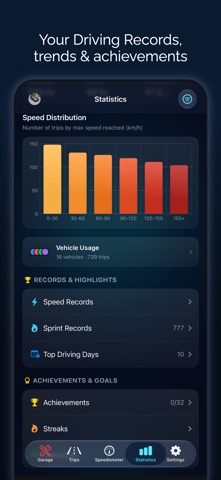
#1 Odo: Speedometer, Drive & Ride iPhone screenshot 1
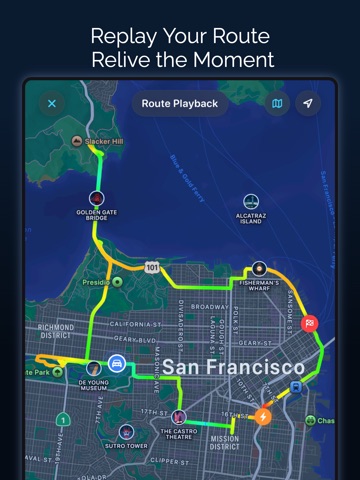
#2 Odo: Speedometer, Drive & Ride iPhone screenshot 2
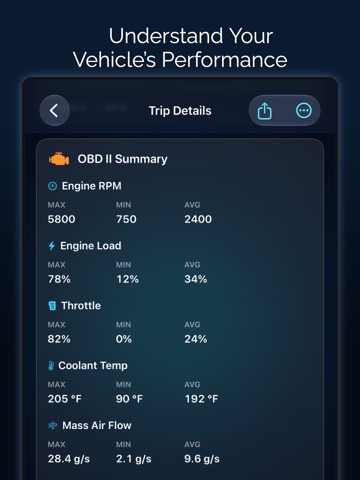
#3 Odo: Speedometer, Drive & Ride iPhone screenshot 3
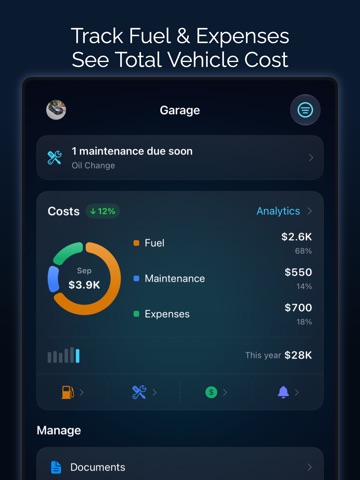
#4 Odo: Speedometer, Drive & Ride iPhone screenshot 4
#5 Odo: Speedometer, Drive & Ride iPhone screenshot 5
#6 Odo: Speedometer, Drive & Ride iPhone screenshot 6
#7 Odo: Speedometer, Drive & Ride iPhone screenshot 7
#8 Odo: Speedometer, Drive & Ride iPhone screenshot 8
#9 Odo: Speedometer, Drive & Ride iPhone screenshot 9
#10 Odo: Speedometer, Drive & Ride iPhone screenshot 10

iPad screenshots

#1 Odo: Speedometer, Drive & Ride iPad screenshot 1
#2 Odo: Speedometer, Drive & Ride iPad screenshot 2
#3 Odo: Speedometer, Drive & Ride iPad screenshot 3
#4 Odo: Speedometer, Drive & Ride iPad screenshot 4
#5 Odo: Speedometer, Drive & Ride iPad screenshot 5
#6 Odo: Speedometer, Drive & Ride iPad screenshot 6
#7 Odo: Speedometer, Drive & Ride iPad screenshot 7
#8 Odo: Speedometer, Drive & Ride iPad screenshot 8
#9 Odo: Speedometer, Drive & Ride iPad screenshot 9
#10 Odo: Speedometer, Drive & Ride iPad screenshot 10

Icon palette

extracting…
Dominant colors sampled from the icon — click any swatch to copy the hex.

About this app

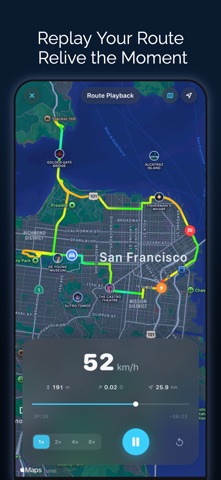
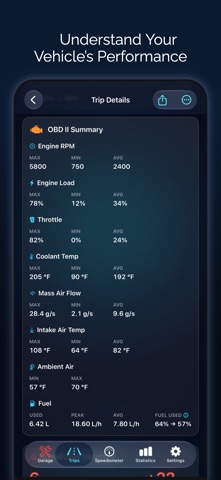
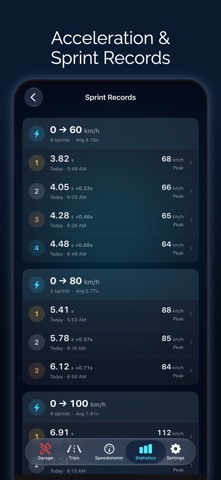
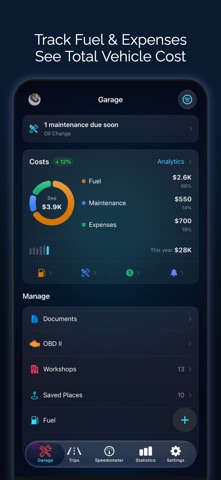
Odo is a GPS speedometer, drive and mileage tracker for car, motorcycle and bike, on iPhone, iPad and CarPlay. Record every drive automatically, get speed limit alerts, navigate turn by turn, time 0-60 sprints, read OBD2 codes, and keep your mileage log, fuel, EV charging and maintenance in one place. AUTOMATIC TRIP TRACKING • Trips start and stop on their own using motion detection, CarPlay or Bluetooth, for car, motorcycle or bike • Auto-pause, auto-end and automatic vehicle matching by CarPlay, Bluetooth or VIN • Distance, duration, moving time, average and top speed, elevation, turns and max G-force • Mileage tracker for work or personal trips: tags, saved places, auto-tagging, favorites, merge and split LIVE SPEEDOMETER • Digital, analog, map and windshield HUD displays in mph, km/h, knots or m/s • 50+ gauge designs, from automotive and sport to marine and aviation • Speed limit …

App details

Bundle ID
com.speedometerproapp.Speedometer
Latest version
4.1.0
Released
Mar 5, 2026
Last updated
Oct 9, 2026
Languages
33 (AR, CA, HR, CS, DA…)
Genres
Navigation, Utilities

What you can learn from Odo: Speedometer, Drive & Ride

Every shipping app on the App Store has gone through the same decisions you're working through right now: which screenshot goes first, what caption sits over it, which device frame to show, what color the background should be. The 20 screenshots above are Odo: Speedometer, Drive & Ride's answers to those questions — they're public, they're real, and they made it through Apple's review.

What the numbers say: Odo: Speedometer, Drive & Ride runs a dark set with one background colour (#0C1C2C) carried across every screenshot — the listing reads as a single poster when the shots sit side by side in search results. The accent colour we picked up, #2C5C6C, is the one to reuse for badges, arrows and highlighted words if you borrow this look. Hit Use this style to open the editor with these exact colours and drop your own screenshot in.

Notice the first screenshot in particular. It's the one users see in search results and on the product page, and it's where most apps spend their best caption and tightest design. Look at the proportion of background to phone, where the text sits, what one thing the image is trying to communicate.

Want to see how other Navigation apps approach the same problem? Browse more Navigation apps in the showcase.

Take what works into your own screenshots

Open LaunchShots and design your App Store & Google Play screenshots — pick a device frame, drop captions, ship in minutes. Free, in your browser.

Open the screenshot editor →

Apps with a similar look

Closest background + accent colours among the listings we've analysed — useful when you want to see the same palette handled by a different team.

Blixtspårare & åskväder
#0C1C2C #2C546C
내친소- 신뢰있는 소개팅: 연애 데이트 직장인
#0C1C2C #345474
AMC+ | TV Shows & Movies
#141C2C #2C646C
Type Skeleton
#141C2C #34546C
Meteo2 - Previsioni e Radar
#0C142C #345C74
1 Infinite
#0C1C2C #2C647C

More Navigation apps

Latest from the blog

News
Google Play Target API Level Deadline: Android 15 Migration
Oct 13, 2026
Guides
How to Configure App Store Server Notifications V2 in App Store Connect
Oct 12, 2026
Build in public
Free Tool Marketing for Indie Apps: The LaunchShots Funnel
Oct 11, 2026
Guides
iOS App Launch Day: The Pre-Submission Checklist
Oct 10, 2026
1 / 1
copied