Screenshot changes — detected by LaunchShots
Screenshot style breakdown
Sampled from 5 of BEYOND OH! プラットフォーム's App Store screenshots — background, accent and theme, measured by LaunchShots (not something Apple publishes).
#FCDC04 bg
#DDC103
#FCF45C accent
#111111 text
Reading the caption text from the screenshots in your browser…
Screenshots

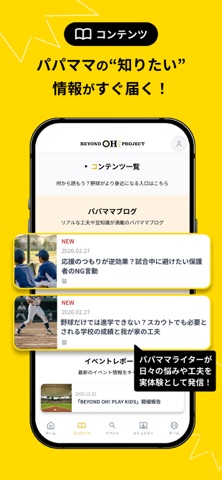

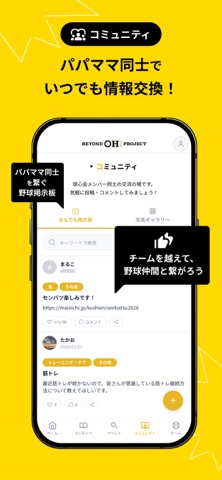
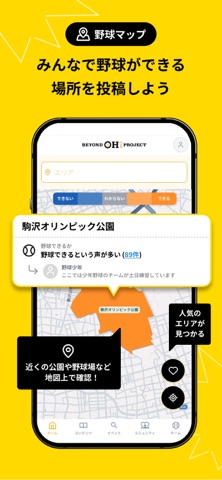
iPad screenshots


Icon palette
About this app
「野球を始めたい。でも、何から始めればいいかわからない。」 そんな保護者や子どもの不安に寄り添い、野球を「始める」「続ける」を支えるアプリです。先輩パパママの知恵が詰まったブログや、近くのチーム・イベント検索など、親子の野球ライフをサポートする機能が満載! 【主な機能】 みんなで作る「野球マップ」 「近所でキャッチボールができる公園はどこ?」そんな疑問を解決します。ユーザーの投稿をもとに、野球やキャッチボールができる場所、NPB公認の壁当てスポットなどを地図上で簡単に探せます。 先輩の知恵が詰まった「パパママブログ」 野球キッズを育てる保護者のリアルな実体験を発信。毎日の食事や体づくり、メンタルケア、当番の悩みなど、同じ立場だからこそ共感できる実践的なアイデアやノウハウが詰まっています。 初心者向け「初めての野球ガイド」 「ルールがわからない」「道具は何を揃えればいい?」といった疑問を優しく解説。野球を始めるときの不安を解消する、親子向けの入門ガイドです。 自分に合った「チームを探す」 居住地…
App details
What you can learn from BEYOND OH! プラットフォーム
Every shipping app on the App Store has gone through the same decisions you're working through right now: which screenshot goes first, what caption sits over it, which device frame to show, what color the background should be. The 8 screenshots above are BEYOND OH! プラットフォーム's answers to those questions — they're public, they're real, and they made it through Apple's review.
What the numbers say: BEYOND OH! プラットフォーム runs a light set with one background colour (#FCDC04) carried across every screenshot — the listing reads as a single poster when the shots sit side by side in search results. The accent colour we picked up, #FCF45C, is the one to reuse for badges, arrows and highlighted words if you borrow this look. Hit Use this style to open the editor with these exact colours and drop your own screenshot in.
Notice the first screenshot in particular. It's the one users see in search results and on the product page, and it's where most apps spend their best caption and tightest design. Look at the proportion of background to phone, where the text sits, what one thing the image is trying to communicate.
Want to see how other Sports apps approach the same problem? Browse more Sports apps in the showcase.
Take what works into your own screenshots
Open LaunchShots and design your App Store & Google Play screenshots — pick a device frame, drop captions, ship in minutes. Free, in your browser.
Open the screenshot editor →Apps with a similar look
Closest background + accent colours among the listings we've analysed — useful when you want to see the same palette handled by a different team.