Screenshot style breakdown
Sampled from 6 of مساعد المعلّم's App Store screenshots — background, accent and theme, measured by LaunchShots (not something Apple publishes).
#D4D4D4 bg
#BABABA
#0C543C accent
#111111 text
Reading the caption text from the screenshots in your browser…
Screenshots



iPad screenshots


Icon palette
About this app
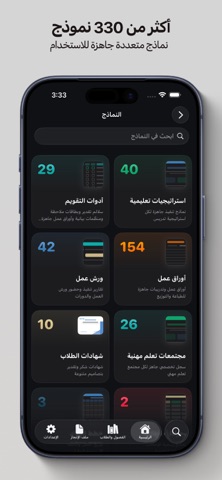
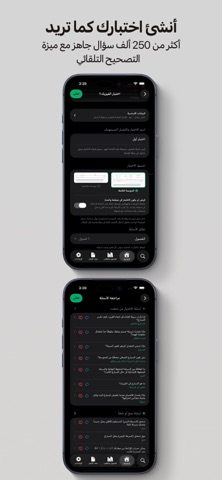
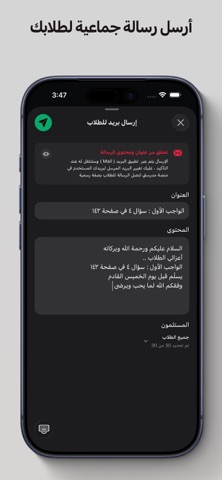
مساعد المعلم هو التطبيق المتكامل الذي يرافق المعلمين والمعلمات من أول يوم دراسي حتى إغلاق العام. صُمّم ليجمع كل ما تحتاجه في مكان واحد: إدارة الفصول والطلاب، رصد الدرجات والحضور والسلوك، إنشاء النماذج والاختبارات، بناء ملف الإنجاز وشواهد الأداء الوظيفي، وأدوات تفاعلية للحصة، بواجهة أنيقة ومتزامنة على جميع أجهزتك. لوحة التحكم اليومية • جدول حصص اليوم في خط زمني، مع عدّاد حيّ للوقت المتبقي في الحصة الحالية أو حتى الحصة القادمة. • اختر أي حصة لتظهر إجراءاتها السريعة: الحضور، المشاركة، الواجبات، السلوك، وأدوات الحصة. • شريط الأسبوع الدراسي وبطاقات الوصول السريع للنماذج وبنك الأسئلة والكتب والملفات. إدارة الطلاب والفصول • أنشئ فصولك بالمرحلة والصف والقسم والمواد بسهولة. • استورد طلابك مباشرة من نظام مدرستي مع مطابقة ذكية للأسماء، أو من Excel وPDF أو بمسح الأسماء ضوئياً أو يدوياً. • ملف شامل لكل طالب: الحضور، الدرجات، السلوك، الواجبات، المشاركة، والمقارنة بالأقران. • نقل الطلاب بين الفصول،…
App details
What you can learn from مساعد المعلّم
Every shipping app on the App Store has gone through the same decisions you're working through right now: which screenshot goes first, what caption sits over it, which device frame to show, what color the background should be. The 11 screenshots above are مساعد المعلّم's answers to those questions — they're public, they're real, and they made it through Apple's review.
What the numbers say: مساعد المعلّم runs a light set with one background colour (#D4D4D4) carried across every screenshot — the listing reads as a single poster when the shots sit side by side in search results. The accent colour we picked up, #0C543C, is the one to reuse for badges, arrows and highlighted words if you borrow this look. Hit Use this style to open the editor with these exact colours and drop your own screenshot in.
Notice the first screenshot in particular. It's the one users see in search results and on the product page, and it's where most apps spend their best caption and tightest design. Look at the proportion of background to phone, where the text sits, what one thing the image is trying to communicate.
Want to see how other Education apps approach the same problem? Browse more Education apps in the showcase.
Take what works into your own screenshots
Open LaunchShots and design your App Store & Google Play screenshots — pick a device frame, drop captions, ship in minutes. Free, in your browser.
Open the screenshot editor →Apps with a similar look
Closest background + accent colours among the listings we've analysed — useful when you want to see the same palette handled by a different team.