Chart position — tracked daily by LaunchShots
Screenshot style breakdown
Sampled from 3 of LUNA | 月に住む英会話パートナー's App Store screenshots — background, accent and theme, measured by LaunchShots (not something Apple publishes).
#FCFCFC bg
#DDDDDD
#04244C accent
#111111 text
Screenshots


Icon palette
About this app
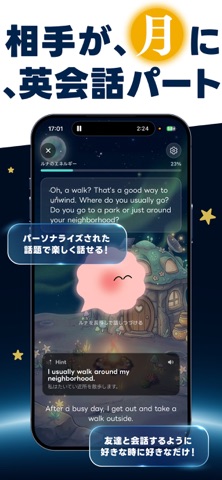
LUNAは、月に住むAIキャラクター「ルナ」と英語で音声会話・テキストチャットができるアプリです。 ■ ルナと話すだけで、英語が身につく テキストを読んだり問題を解いたりする勉強は続かなかった——そんなあなたへ。 LUNAは「英語で誰かと話す」体験そのものを、毎日の習慣に変えます。 あなたの興味・レベルに合わせてルナが会話をリードするから、話題に困ることはありません。 ■ あなただけのAI英会話パートナー ルナはあなたのことを覚えています。好きなこと、最近あったこと、英語のクセ。 話すほどルナはあなたを理解し、あなただけの会話パートナーになります。 ■ まるで友達と話すように ルナとの会話はレッスンではなく、おしゃべりです。 映画の話、週末の予定、今日のニュース——自然なトピックで英語が口から出てくる感覚を掴めます。 間違えても大丈夫。ルナはやさしく、でもしっかり英語をサポートします。 ■ 主な機能 ・AI音声会話:ルナとリアルタイムで英語の音声会話 ・レベル別対応:初級〜上級まで、あなたの英語力に合わせた会話 ・会話テン…
App details
What you can learn from LUNA | 月に住む英会話パートナー
Every shipping app on the App Store has gone through the same decisions you're working through right now: which screenshot goes first, what caption sits over it, which device frame to show, what color the background should be. The 3 screenshots above are LUNA | 月に住む英会話パートナー's answers to those questions — they're public, they're real, and they made it through Apple's review.
What the numbers say: LUNA | 月に住む英会話パートナー runs a light set with one background colour (#FCFCFC) carried across every screenshot — the listing reads as a single poster when the shots sit side by side in search results. The accent colour we picked up, #04244C, is the one to reuse for badges, arrows and highlighted words if you borrow this look. Hit Use this style to open the editor with these exact colours and drop your own screenshot in.
Notice the first screenshot in particular. It's the one users see in search results and on the product page, and it's where most apps spend their best caption and tightest design. Look at the proportion of background to phone, where the text sits, what one thing the image is trying to communicate.
Want to see how other Education apps approach the same problem? Browse more Education apps in the showcase.
Take what works into your own screenshots
Open LaunchShots and design your App Store & Google Play screenshots — pick a device frame, drop captions, ship in minutes. Free, in your browser.
Open the screenshot editor →Apps with a similar look
Closest background + accent colours among the listings we've analysed — useful when you want to see the same palette handled by a different team.