Chart position — tracked daily by LaunchShots
Screenshot changes — detected by LaunchShots
Screenshot style breakdown
Sampled from 6 of MT - Mosh Terminal's App Store screenshots — background, accent and theme, measured by LaunchShots (not something Apple publishes).
#E4CCB4 bg
#C8B39E
#CC946C accent
#111111 text
Screenshots

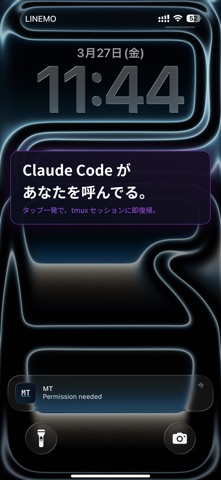


iPad screenshots

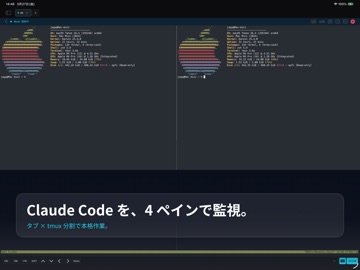


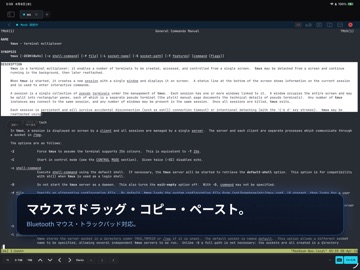
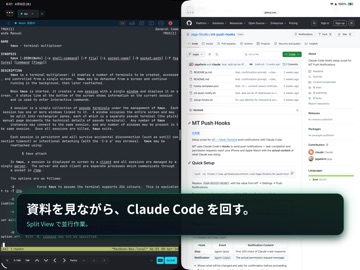
Icon palette
About this app
Claude CodeやCodexと会話しない日はありません。 そんな毎日、席を外してスマホを見た瞬間に 「Do you want to proceed?」を見落としてイライラ したことはありませんか? MT - Mosh Terminal は、Claude Code や Codex などの AI コーディングエージェントを外出先から見守り、介入するためのモバイルコンパニオンです。エージェントが入力待ちになった瞬間、iPhone に Push 通知が届き、ワンタップで該当 tmux セッションに Mosh 経由で即復帰します。 ただの SSH クライアントではない、モバイル開発者のための本格派ターミナルです。iPad + 外部キーボードで Mac と変わらないターミナル体験を実現します。 Claude Code 連携 • Claude Code と Codex CLI の hooks を使ったシステムレベルの Push 通知 • タスク完了・許可リクエストが iPhone と Apple Watch に即座に届く • 通知タップで該当の tmux セッション(ホスト・ユーザー・セッション名を自動マッチ)に自動復帰 • フック2行をペーストするだけで導入完了、CLAUDE.md の設定不要 • セルフホストの Pus…
App details
What you can learn from MT - Mosh Terminal
Every shipping app on the App Store has gone through the same decisions you're working through right now: which screenshot goes first, what caption sits over it, which device frame to show, what color the background should be. The 13 screenshots above are MT - Mosh Terminal's answers to those questions — they're public, they're real, and they made it through Apple's review.
What the numbers say: MT - Mosh Terminal runs a mixed light-and-dark set where the background shifts from screenshot to screenshot (first shot #E4CCB4) — each image has to stand on its own, so the captions carry more of the story. The accent colour we picked up, #CC946C, is the one to reuse for badges, arrows and highlighted words if you borrow this look. Hit Use this style to open the editor with these exact colours and drop your own screenshot in.
Notice the first screenshot in particular. It's the one users see in search results and on the product page, and it's where most apps spend their best caption and tightest design. Look at the proportion of background to phone, where the text sits, what one thing the image is trying to communicate.
Want to see how other Developer Tools apps approach the same problem? Browse more Developer Tools apps in the showcase.
Take what works into your own screenshots
Open LaunchShots and design your App Store & Google Play screenshots — pick a device frame, drop captions, ship in minutes. Free, in your browser.
Open the screenshot editor →Apps with a similar look
Closest background + accent colours among the listings we've analysed — useful when you want to see the same palette handled by a different team.