Chart position — tracked daily by LaunchShots
Screenshot style breakdown
Sampled from 6 of WeSync's App Store screenshots — background, accent and theme, measured by LaunchShots (not something Apple publishes).
#040404 bg
#272727
#94645C accent
#FFFFFF text
Reading the caption text from the screenshots in your browser…
Screenshots


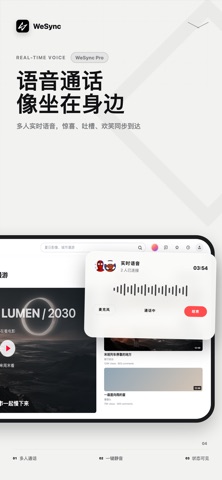


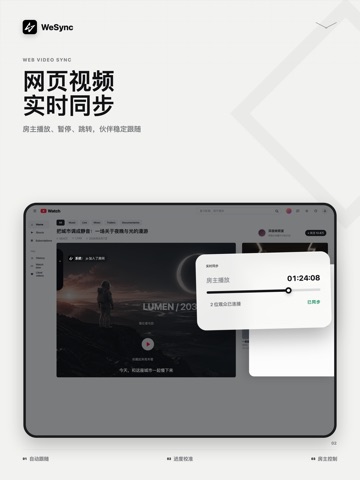
iPad screenshots



Icon palette
About this app
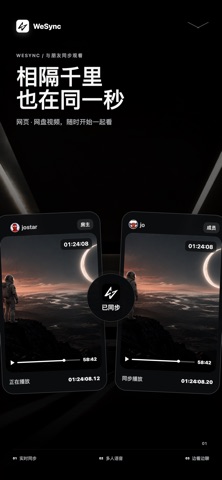
让距离不再决定一个瞬间能否被共同经历。 让远方发生在同一秒。 WeSync 是一款为好友、情侣和家人设计的实时同步观影与即时通讯应用。创建房间、邀请伙伴,即可同步观看网页、网盘或本地视频。播放、暂停、跳转和播放进度保持一致,让远方的人共享同一个精彩瞬间。 【实时同步观看】 房间会同步播放、暂停、跳转与播放进度。遇到网络波动后,WeSync 会持续校准播放状态,让每个人回到同一个时间点。 【全局弹幕】 好友发出的消息可以化作弹幕横跨画面。无需切换页面,也不会错过正在播放的精彩内容,让每一句吐槽、回应与惊叹都与视频同时发生。 【你习惯怎么看,就怎么一起看】 通过内置浏览器打开网页视频,选择受支持的网盘内容,或播放设备中的本地视频。 【边看边聊】 房间消息覆盖在播放画面上;实时语音让讨论、笑声和沉默都自然发生。反应发生时,朋友就在身边。 【好友与消息】 添加好友、发起会话、查看历史消息,并将重要的人快速邀请进观影房间。 只需三步: 1. 创建观影房间 2. 邀请好友加入 3. 选择视频,一起播放 使用条款(EULA): https://…
App details
What you can learn from WeSync
Every shipping app on the App Store has gone through the same decisions you're working through right now: which screenshot goes first, what caption sits over it, which device frame to show, what color the background should be. The 16 screenshots above are WeSync's answers to those questions — they're public, they're real, and they made it through Apple's review.
What the numbers say: WeSync runs a mixed light-and-dark set where the background shifts from screenshot to screenshot (first shot #040404) — each image has to stand on its own, so the captions carry more of the story. The accent colour we picked up, #94645C, is the one to reuse for badges, arrows and highlighted words if you borrow this look. Hit Use this style to open the editor with these exact colours and drop your own screenshot in.
Notice the first screenshot in particular. It's the one users see in search results and on the product page, and it's where most apps spend their best caption and tightest design. Look at the proportion of background to phone, where the text sits, what one thing the image is trying to communicate.
Want to see how other Entertainment apps approach the same problem? Browse more Entertainment apps in the showcase.
Take what works into your own screenshots
Open LaunchShots and design your App Store & Google Play screenshots — pick a device frame, drop captions, ship in minutes. Free, in your browser.
Open the screenshot editor →Apps with a similar look
Closest background + accent colours among the listings we've analysed — useful when you want to see the same palette handled by a different team.