Chart position — tracked daily by LaunchShots
Screenshot changes — detected by LaunchShots
Screenshot style breakdown
Sampled from 6 of Clarté : Coach d'éloquence's App Store screenshots — background, accent and theme, measured by LaunchShots (not something Apple publishes).
#242C44 bg
#42495E
#CCAC4C accent
#FFFFFF text
Screenshots




Icon palette
About this app
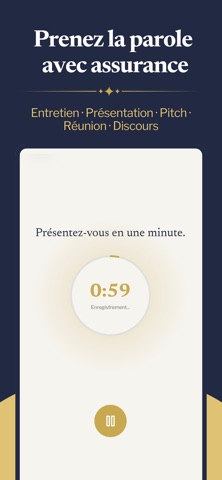
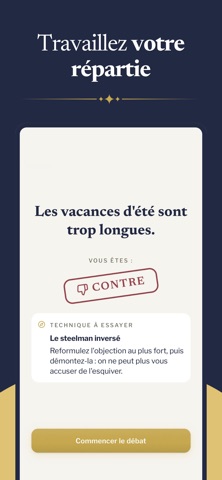
Devenez éloquent en 5 minutes par jour. Clarté est votre coach personnel de prise de parole, propulsé par l'intelligence artificielle. Enregistrez votre voix, et recevez en quelques secondes une analyse précise de votre éloquence. ▸ UNE MÉTHODE HÉRITÉE D'ARISTOTE Chaque enregistrement est analysé selon les trois piliers de l'art oratoire, codifiés il y a 2 400 ans et toujours d'actualité : - Logos — la solidité de votre raisonnement et la structure de vos idées - Ethos — la crédibilité que votre voix transmet à votre auditoire - Pathos — l'impact émotionnel que vous laissez après avoir parlé Une grille rhétorique éprouvée, appliquée par l'IA à votre propre voix. ▸ POUR TOUS VOS MOMENTS DE PRISE DE PAROLE - Entretien d'embauche - Présentation professionnelle - Pitch investisseur - Réunion d'équipe - Discours en public - Conversation du quotidien Que vous prépariez une intervent…
App details
What you can learn from Clarté : Coach d'éloquence
Every shipping app on the App Store has gone through the same decisions you're working through right now: which screenshot goes first, what caption sits over it, which device frame to show, what color the background should be. The 7 screenshots above are Clarté : Coach d'éloquence's answers to those questions — they're public, they're real, and they made it through Apple's review.
What the numbers say: Clarté : Coach d'éloquence runs a dark set with one background colour (#242C44) carried across every screenshot — the listing reads as a single poster when the shots sit side by side in search results. The accent colour we picked up, #CCAC4C, is the one to reuse for badges, arrows and highlighted words if you borrow this look. Hit Use this style to open the editor with these exact colours and drop your own screenshot in.
Notice the first screenshot in particular. It's the one users see in search results and on the product page, and it's where most apps spend their best caption and tightest design. Look at the proportion of background to phone, where the text sits, what one thing the image is trying to communicate.
Want to see how other Education apps approach the same problem? Browse more Education apps in the showcase.
Take what works into your own screenshots
Open LaunchShots and design your App Store & Google Play screenshots — pick a device frame, drop captions, ship in minutes. Free, in your browser.
Open the screenshot editor →Apps with a similar look
Closest background + accent colours among the listings we've analysed — useful when you want to see the same palette handled by a different team.