Chart position — tracked daily by LaunchShots
Screenshot style breakdown
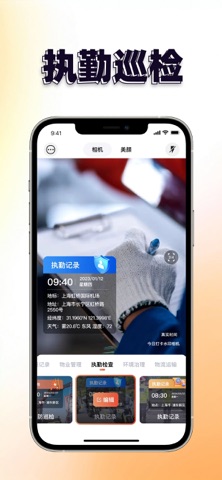
Sampled from 5 of 水印相机-时间地点和工作水印,相机记录's App Store screenshots — background, accent and theme, measured by LaunchShots (not something Apple publishes).
#FCFCFC bg
#DDDDDD
#FCB46C accent
#111111 text
Screenshots



Icon palette
About this app
你的拍照,记录画面,更定格真实可溯的每一瞬间! “水印相机-时间地点和工作水印,相机记录”是一款为高效记录量身打造的专业相机应用,搭载全场景水印模板与实用工具,无论是工作留痕还是生活记录,都能一键生成带完整信息的规范照片,让记录更高效、更可信。 核心功能 1. 全场景水印模板 - 工作专用水印:覆盖考勤打卡、执勤巡检、工程施工、值班记录、电路检修、物业管理、外勤拍照等职场场景,规范工作留痕,高效溯源。 - 通用生活水印:适配旅行打卡、日常随拍、宝宝成长、家庭记录等场景,定格美好瞬间,留存完整记忆。 2.多维信息 - 支持添加时间、天气、实时定位、海拔、经纬度等地理气象信息,还可添加负责人、工作类型、心情标签,让每张照片信息完整、一目了然。 3.实用效率工具 - 内置多款便捷小工具,优化拍摄体验,搭配创意拼图模板,可快速拼接工作照片、生成工作报告,大幅提升办公效率。 【VIP会员】 - 付款:用户确认购买并付款后记入 iTunes 账户。 - 取消续订:如需取消续订,请在当前订阅到期 24 小时以前,手动在iTunes/Apple ID 设置管理中关闭…
App details
What you can learn from 水印相机-时间地点和工作水印,相机记录
Every shipping app on the App Store has gone through the same decisions you're working through right now: which screenshot goes first, what caption sits over it, which device frame to show, what color the background should be. The 5 screenshots above are 水印相机-时间地点和工作水印,相机记录's answers to those questions — they're public, they're real, and they made it through Apple's review.
What the numbers say: 水印相机-时间地点和工作水印,相机记录 runs a light set with one background colour (#FCFCFC) carried across every screenshot — the listing reads as a single poster when the shots sit side by side in search results. The accent colour we picked up, #FCB46C, is the one to reuse for badges, arrows and highlighted words if you borrow this look. Hit Use this style to open the editor with these exact colours and drop your own screenshot in.
Notice the first screenshot in particular. It's the one users see in search results and on the product page, and it's where most apps spend their best caption and tightest design. Look at the proportion of background to phone, where the text sits, what one thing the image is trying to communicate.
Want to see how other Lifestyle apps approach the same problem? Browse more Lifestyle apps in the showcase.
Take what works into your own screenshots
Open LaunchShots and design your App Store & Google Play screenshots — pick a device frame, drop captions, ship in minutes. Free, in your browser.
Open the screenshot editor →Apps with a similar look
Closest background + accent colours among the listings we've analysed — useful when you want to see the same palette handled by a different team.