Chart position — tracked daily by LaunchShots
Screenshot changes — detected by LaunchShots
Screenshot style breakdown
Sampled from 5 of MLXHub: ローカルAIチャット's App Store screenshots — background, accent and theme, measured by LaunchShots (not something Apple publishes).
#0C0C04 bg
#2E2E27
#8C5C04 accent
#FFFFFF text
Screenshots
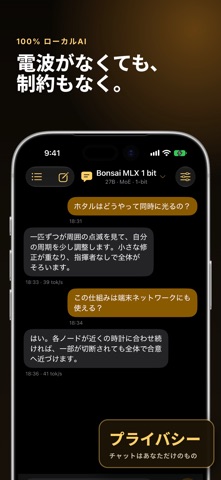


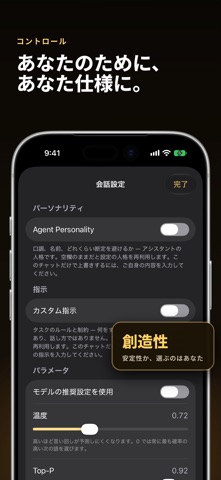
iPad screenshots


Icon palette
About this app
端末内でAIを実行。あなたのデバイス。あなたのデータ。 MLXHubは、Apple Siliconとmlx-swift推論エンジンを搭載し、オープンソースの言語モデルをiPhoneとiPadで動かします。会話が端末の外に出ることはありません。 デバイス間の分散推論(実験的機能) 同じWi-Fiネットワーク上にある複数のApple Siliconデバイスのメモリを束ねて、どの1台でも単独では収まらないモデルを実行できます。1台がホストになり、他のデバイスが参加してモデルの各層を分担します——どのデバイスもモデル全体を保持しません。ホストは各デバイスに、そのデバイスが担当する層に必要なファイルだけを送信し、キャッシュして次回の起動を速くします。 ご利用にあたって:すべてのデバイスが同じWi-Fiに接続している必要があります。初回は両方の画面に表示されるコードを照合して各デバイスを承認します。分割の前に、MLXHubが各デバイスのメモリを計測します。これは実験的機能です。分散生成は動作しますが、実行が停止したりデバイスが脱落したりすることがまだあり、すべてのモデル…
App details
What you can learn from MLXHub: ローカルAIチャット
Every shipping app on the App Store has gone through the same decisions you're working through right now: which screenshot goes first, what caption sits over it, which device frame to show, what color the background should be. The 10 screenshots above are MLXHub: ローカルAIチャット's answers to those questions — they're public, they're real, and they made it through Apple's review.
What the numbers say: MLXHub: ローカルAIチャット runs a dark set with one background colour (#0C0C04) carried across every screenshot — the listing reads as a single poster when the shots sit side by side in search results. The accent colour we picked up, #8C5C04, is the one to reuse for badges, arrows and highlighted words if you borrow this look. Hit Use this style to open the editor with these exact colours and drop your own screenshot in.
Notice the first screenshot in particular. It's the one users see in search results and on the product page, and it's where most apps spend their best caption and tightest design. Look at the proportion of background to phone, where the text sits, what one thing the image is trying to communicate.
Want to see how other Developer Tools apps approach the same problem? Browse more Developer Tools apps in the showcase.
Take what works into your own screenshots
Open LaunchShots and design your App Store & Google Play screenshots — pick a device frame, drop captions, ship in minutes. Free, in your browser.
Open the screenshot editor →Apps with a similar look
Closest background + accent colours among the listings we've analysed — useful when you want to see the same palette handled by a different team.