Screenshot changes — detected by LaunchShots
Screenshot style breakdown
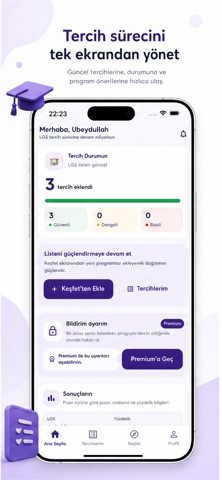
Sampled from 4 of Tercih Simülasyonu's App Store screenshots — background, accent and theme, measured by LaunchShots (not something Apple publishes).
#FCFCFC bg
#DDDDDD
#644CA4 accent
#111111 text
Reading the caption text from the screenshots in your browser…
Screenshots



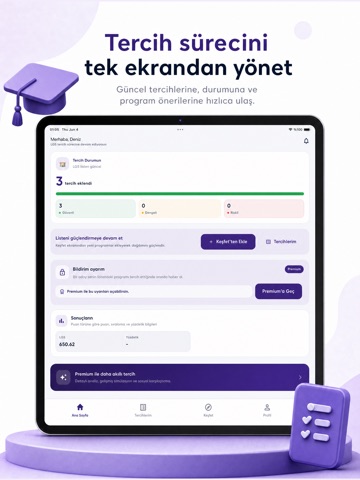
iPad screenshots


Icon palette
About this app
Tercih Simülasyonu, sınav sonucuna göre tercih listeni hazırlamana ve seçtiğin programlara yerleşme ihtimalini önceden görmene yardımcı olan tercih asistanıdır. Sonucunu gir, ilgilendiğin bölümleri veya programları tercih listene ekle, sıralamanı geçmiş yıl verileriyle karşılaştır. Uygulama; taban puan, başarı sıralaması, kontenjan ve diğer adayların tercihlerini birlikte değerlendirerek yerleşme senaryonu simüle eder. Tercih Simülasyonu ile: Sınav sonucunu ekleyebilirsin. Bölüm ve programları arayabilirsin. Geçmiş yılların taban puanlarını, sıralamalarını ve kontenjanlarını inceleyebilirsin. Kendi tercih listeni oluşturup sıralayabilirsin. Diğer adayların hangi programları tercih ettiğini görebilirsin. Seçtiğin programa yerleşme ihtimalini daha bilinçli değerlendirebilirsin. YKS, DGS, LGS, TUS, DUS, MSÜ ve KPSS gibi Türkiye’deki merkezi sınavlar için tercih sürecini daha anlaşılır v…
App details
What you can learn from Tercih Simülasyonu
Every shipping app on the App Store has gone through the same decisions you're working through right now: which screenshot goes first, what caption sits over it, which device frame to show, what color the background should be. The 8 screenshots above are Tercih Simülasyonu's answers to those questions — they're public, they're real, and they made it through Apple's review.
What the numbers say: Tercih Simülasyonu runs a light set with one background colour (#FCFCFC) carried across every screenshot — the listing reads as a single poster when the shots sit side by side in search results. The accent colour we picked up, #644CA4, is the one to reuse for badges, arrows and highlighted words if you borrow this look. Hit Use this style to open the editor with these exact colours and drop your own screenshot in.
Notice the first screenshot in particular. It's the one users see in search results and on the product page, and it's where most apps spend their best caption and tightest design. Look at the proportion of background to phone, where the text sits, what one thing the image is trying to communicate.
Want to see how other Education apps approach the same problem? Browse more Education apps in the showcase.
Take what works into your own screenshots
Open LaunchShots and design your App Store & Google Play screenshots — pick a device frame, drop captions, ship in minutes. Free, in your browser.
Open the screenshot editor →Apps with a similar look
Closest background + accent colours among the listings we've analysed — useful when you want to see the same palette handled by a different team.