Chart position — tracked daily by LaunchShots
Screenshot style breakdown
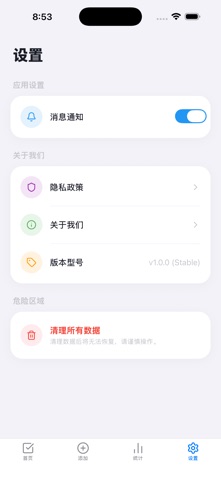
Sampled from 5 of checkin-app's App Store screenshots — background, accent and theme, measured by LaunchShots (not something Apple publishes).
#F4F4FC bg
#D6D6DD
#0C74E4 accent
#111111 text
Reading the caption text from the screenshots in your browser…
Screenshots


Icon palette
About this app
【日积月累 - 用视频记录改变,用习惯成就自我】 “日积月累”是一款专为追求自律与高效生活的你打造的本地习惯打卡与任务管理工具。我们打破了传统打卡应用只冷冰冰地“打勾”的限制,创新地引入了“鼓励视频”功能,让你的每一次坚持都变得有声有色、清晰可见。 【核心功能亮点】 1. 极简任务打卡: 一键创建你每天想坚持的习惯或待办任务。支持添加备注细节,并可开启“每日重复”模式,每天自动为你规划好自律清单。 2. 独特的“鼓励视频”记录: 在创建任务时,你可以录制一段长达 60 秒的视频。你可以对未来的自己说一句鼓励的话、拍下健身流汗的瞬间、或者记录早起读书的清晨。在打卡首页点击播放,给自己最真切的坚持动力! 3. 直观的统计报告: 提供精美的“今日完成率”环形统计、“今日完成数量对比”以及“本周累计坚持项”,用直观的数据反馈你的成长足迹,让每一次努力都算数。 4. 100% 隐私与离线安全: 我们深知您的习惯和视频属于绝对隐私。本应用采用本地数据库(SQLite)存储,所有数据和视频仅保存在您的手机中,无需联网,不收集任何用户隐私,安全且响应…
App details
What you can learn from checkin-app
Every shipping app on the App Store has gone through the same decisions you're working through right now: which screenshot goes first, what caption sits over it, which device frame to show, what color the background should be. The 5 screenshots above are checkin-app's answers to those questions — they're public, they're real, and they made it through Apple's review.
What the numbers say: checkin-app runs a mixed light-and-dark set where the background shifts from screenshot to screenshot (first shot #F4F4FC) — each image has to stand on its own, so the captions carry more of the story. The accent colour we picked up, #0C74E4, is the one to reuse for badges, arrows and highlighted words if you borrow this look. Hit Use this style to open the editor with these exact colours and drop your own screenshot in.
Notice the first screenshot in particular. It's the one users see in search results and on the product page, and it's where most apps spend their best caption and tightest design. Look at the proportion of background to phone, where the text sits, what one thing the image is trying to communicate.
Want to see how other Lifestyle apps approach the same problem? Browse more Lifestyle apps in the showcase.
Take what works into your own screenshots
Open LaunchShots and design your App Store & Google Play screenshots — pick a device frame, drop captions, ship in minutes. Free, in your browser.
Open the screenshot editor →Apps with a similar look
Closest background + accent colours among the listings we've analysed — useful when you want to see the same palette handled by a different team.