Chart position — tracked daily by LaunchShots
Screenshot style breakdown
Sampled from 6 of Today: 个人 AI 助理's App Store screenshots — background, accent and theme, measured by LaunchShots (not something Apple publishes).
#ECF4FC bg
#CFD6DD
#2C445C accent
#111111 text
Reading the caption text from the screenshots in your browser…
Screenshots


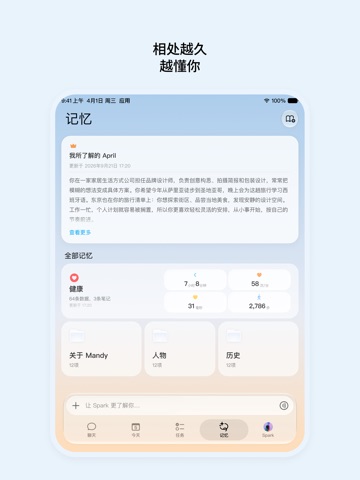
iPad screenshots



Icon palette
About this app
Today 是一个会记得你,并主动帮你做事的个人 AI 助理。它逐步了解你的日常、项目和偏好,用这些背景发现重要变化、跟进未完成事项、准备下一步。 你可以把研究、资料整理或需要持续处理的任务交给 Today。它能在后台同时推进多项任务,不必一直留在对话中,可以之后再查看进展和结果。 Today 也支持学习、健康等长期目标。它保留之前的讨论和相关背景,让后续计划和任务接着往下做,减少重复解释。 自然交流,交代需求 通过文字或语音与 Today 沟通,也可以分享图片和文件。无论是一个简单问题,还是需要多步处理的任务,都可以直接说清楚你想做什么。 记得背景,减少重复解释 Today 可以记住你分享过的重要信息,包括目标、偏好和项目背景,让后续帮助更贴合你的情况。你可以查看、修改或删除它记住的内容。 完成任务,不必一直守着对话 把研究、方案比较、资料整理等工作交给 Today。它能在后台同时推进多项任务,你可以先做自己的事,之后再查看进展和结果。需要定期处理的事情,也可以设为定时任务。 操作网页,把任务继续做下去 通过浏览器自动化能力,To…
App details
What you can learn from Today: 个人 AI 助理
Every shipping app on the App Store has gone through the same decisions you're working through right now: which screenshot goes first, what caption sits over it, which device frame to show, what color the background should be. The 12 screenshots above are Today: 个人 AI 助理's answers to those questions — they're public, they're real, and they made it through Apple's review.
What the numbers say: Today: 个人 AI 助理 runs a light set with one background colour (#ECF4FC) carried across every screenshot — the listing reads as a single poster when the shots sit side by side in search results. The accent colour we picked up, #2C445C, is the one to reuse for badges, arrows and highlighted words if you borrow this look. Hit Use this style to open the editor with these exact colours and drop your own screenshot in.
Notice the first screenshot in particular. It's the one users see in search results and on the product page, and it's where most apps spend their best caption and tightest design. Look at the proportion of background to phone, where the text sits, what one thing the image is trying to communicate.
Want to see how other Utilities apps approach the same problem? Browse more Utilities apps in the showcase.
Take what works into your own screenshots
Open LaunchShots and design your App Store & Google Play screenshots — pick a device frame, drop captions, ship in minutes. Free, in your browser.
Open the screenshot editor →Apps with a similar look
Closest background + accent colours among the listings we've analysed — useful when you want to see the same palette handled by a different team.