Screenshots


Icon palette
About this app
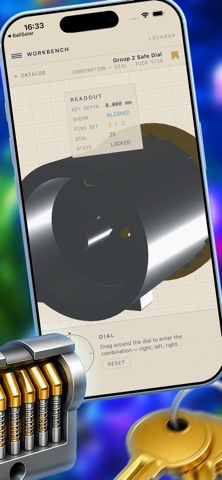
LockBar is an educational reference for locksmith apprentices, security researchers, and the recreational lockpicking (Locksport) community. Every lock is a fully interactive 3D cutaway you can rotate, section, take apart, and operate — a digital service manual for understanding how mechanical locks actually work. No videos, no diagrams to squint at. Real-time 3D mechanisms you can take apart with your hands. A WORKSHOP, NOT A TOY LockBar is built like a machinist's reference book meets an engineering blueprint. Precise, technical, and clear enough for a beginner — confident enough that a working locksmith will respect it. THE WORKBENCH • Rotate any lock in 3D and inspect it from every angle • Section view — peel away the case to reveal the interior, with cut surfaces marked like a real engineering drawing • Exploded view — separate every component to understand assembly order • Tran…
App details
What you can learn from Lockbar
Every shipping app on the App Store has gone through the same decisions you're working through right now: which screenshot goes first, what caption sits over it, which device frame to show, what color the background should be. The 7 screenshots above are Lockbar's answers to those questions — they're public, they're real, and they made it through Apple's review.
Notice the first screenshot in particular. It's the one users see in search results and on the product page, and it's where most apps spend their best caption and tightest design. Look at the proportion of background to phone, where the text sits, what one thing the image is trying to communicate.
Want to see how other Graphics & Design apps approach the same problem? Browse more Graphics & Design apps in the showcase.
Take what works into your own screenshots
Open LaunchShots and design your App Store & Google Play screenshots — pick a device frame, drop captions, ship in minutes. Free, in your browser.
Open the screenshot editor →