Chart position — tracked daily by LaunchShots
Screenshot style breakdown
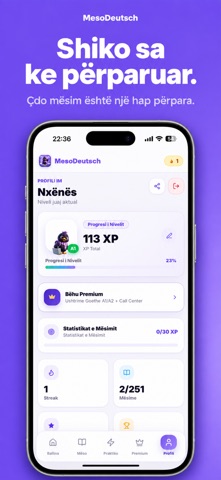
Sampled from 4 of MesoDeutsch's App Store screenshots — background, accent and theme, measured by LaunchShots (not something Apple publishes).
#744CF4 bg
#8765F5
#4C34A4 accent
#FFFFFF text
Screenshots


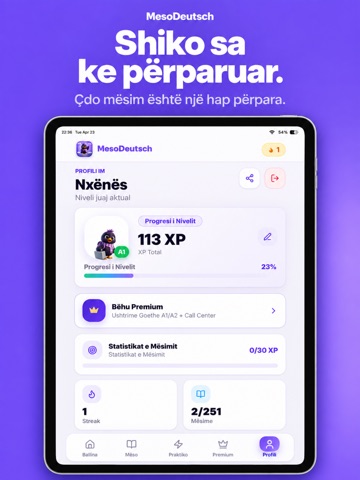
iPad screenshots


Icon palette
About this app
MesoDeutsch - Mëso gjermanisht në mënyrën më të lehtë! E krijuar posaçërisht për shqiptarët që duan të mësojnë gjermanisht - qoftë për punë, studime, emigrim apo udhëtim. Mësimet janë në shqip, kështu që e kupton gjithçka qartë. ÇFARË TË OFRON MESODEUTSCH Mësime nga A1 deri C1 Mëso hap pas hapi, nga fillestar deri ekspert. Çdo mësim ka fjalor, shembuj dhe ushtrime interaktive. Kartela (Flashcards) Përsërit fjalët me sistemin e kartelave. Krijo setet e tua ose përdor ato të gatshmet. Sfida Ditore Çdo ditë një sfidë e re me 2x XP! Mban streak-un dhe konkurro me veten. Quiz interaktiv Testo njohuritë me quiz të shpejtë dhe argëtues. Sistem XP dhe Arritjesh Fito pikë, hap nivele të reja dhe zhblloko arritje ndërsa mëson. Ndiq progresin tënd Shiko statistikat, streak-un dhe nivelin në çdo moment. Teste niveli Kalo testin për të kaluar nga një nivel në tjetrin - ose kërce direkt nëse…
App details
What you can learn from MesoDeutsch
Every shipping app on the App Store has gone through the same decisions you're working through right now: which screenshot goes first, what caption sits over it, which device frame to show, what color the background should be. The 9 screenshots above are MesoDeutsch's answers to those questions — they're public, they're real, and they made it through Apple's review.
What the numbers say: MesoDeutsch runs a dark set with one background colour (#744CF4) carried across every screenshot — the listing reads as a single poster when the shots sit side by side in search results. The accent colour we picked up, #4C34A4, is the one to reuse for badges, arrows and highlighted words if you borrow this look. Hit Use this style to open the editor with these exact colours and drop your own screenshot in.
Notice the first screenshot in particular. It's the one users see in search results and on the product page, and it's where most apps spend their best caption and tightest design. Look at the proportion of background to phone, where the text sits, what one thing the image is trying to communicate.
Want to see how other Education apps approach the same problem? Browse more Education apps in the showcase.
Take what works into your own screenshots
Open LaunchShots and design your App Store & Google Play screenshots — pick a device frame, drop captions, ship in minutes. Free, in your browser.
Open the screenshot editor →Apps with a similar look
Closest background + accent colours among the listings we've analysed — useful when you want to see the same palette handled by a different team.