Screenshot changes — detected by LaunchShots
Screenshot style breakdown
Sampled from 6 of 火锅侠 - 火锅计时器's App Store screenshots — background, accent and theme, measured by LaunchShots (not something Apple publishes).
#ECDCBC bg
#CFC1A5
#C45C5C accent
#111111 text
Reading the caption text from the screenshots in your browser…
Screenshots




Icon palette
About this app
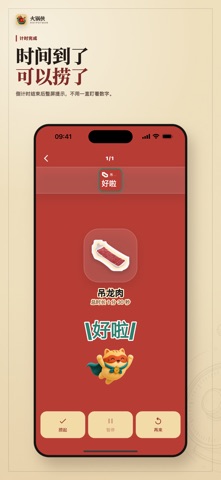
火锅侠是一款为火锅局准备的单机计时工具。 毛肚要脆,鸭血要嫩,肥牛要刚刚变色,丸子要熟透但不能久煮。不同食材最好的风味,往往就藏在那几十秒里。 火锅侠内置常见火锅食材的参考时间,也支持你添加自己的自定义时间。无论是店里的招牌吃法,还是你自己习惯的口感,都可以按自己的节奏来。 下锅后,火锅侠会用清楚的状态提示你:已经熟了、快到点了、还可以再等等。让食材在口感最好的时候离锅,保留原本的鲜、嫩、脆和香。 你还可以同时计时多个食材,查看下锅记录和本局统计,并生成一张有趣的火锅报告或海报记录,分享给一起吃火锅的朋友。 所有数据都保存在本机,不需要登录,也不依赖网络。 使用条款:https://www.apple.com/legal/internet-services/itunes/dev/stdeula/ 隐私政策:https://rgcode.top/hotpotman/privacy-policy.html
App details
What you can learn from 火锅侠 - 火锅计时器
Every shipping app on the App Store has gone through the same decisions you're working through right now: which screenshot goes first, what caption sits over it, which device frame to show, what color the background should be. The 10 screenshots above are 火锅侠 - 火锅计时器's answers to those questions — they're public, they're real, and they made it through Apple's review.
What the numbers say: 火锅侠 - 火锅计时器 runs a light set with one background colour (#ECDCBC) carried across every screenshot — the listing reads as a single poster when the shots sit side by side in search results. The accent colour we picked up, #C45C5C, is the one to reuse for badges, arrows and highlighted words if you borrow this look. Hit Use this style to open the editor with these exact colours and drop your own screenshot in.
Notice the first screenshot in particular. It's the one users see in search results and on the product page, and it's where most apps spend their best caption and tightest design. Look at the proportion of background to phone, where the text sits, what one thing the image is trying to communicate.
Want to see how other Food & Drink apps approach the same problem? Browse more Food & Drink apps in the showcase.
Take what works into your own screenshots
Open LaunchShots and design your App Store & Google Play screenshots — pick a device frame, drop captions, ship in minutes. Free, in your browser.
Open the screenshot editor →Apps with a similar look
Closest background + accent colours among the listings we've analysed — useful when you want to see the same palette handled by a different team.