Screenshot style breakdown
Sampled from 5 of Tagico|多義語で学ぶ英単語's App Store screenshots — background, accent and theme, measured by LaunchShots (not something Apple publishes).
#E4FCF4 bg
#C8DDD6
#2CD4BC accent
#111111 text
Reading the caption text from the screenshots in your browser…
Screenshots



Icon palette
About this app
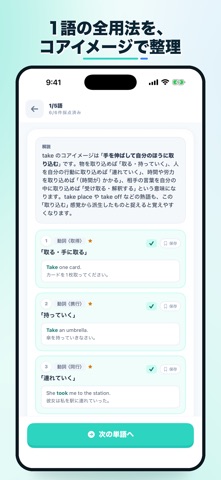
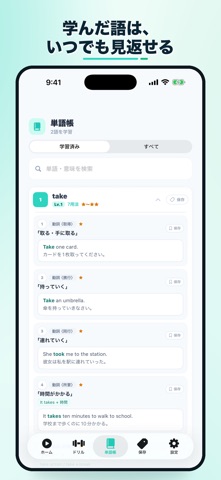
「will=〜だろう」だけでは、英文は読めるようになりません。 「〜するつもりだ」「〜するものだ」など、文脈によって自然な日本語訳は変わります。Tagicoは、1つの英単語にある複数の用法をクイズ形式で見分けながら、訳し分ける感覚を鍛える学習アプリです。 【Tagicoでできること】 ・英文の文脈から意味を思い出し、答えを確認して自己採点 ・難しい場合は、ヒントで候補を表示 ・単語ごとの用法まとめ、例文、コアイメージ解説 ・当日、3日後、1週間後、1ヶ月後の復習スケジュール ・付箋をつけた用法やブックマークした単語の集中復習 ・ランダム出題で定着度を確認 ・ログイン機能により学習進捗を他の端末と同期 無料版では40語を学習できます。全300語が解放できるTagico Proの価格は、リリース記念として490円です。通常価格は980円を予定しています。 「1つの英単語には無数の訳し方がある」。 そう意識しながら、英文を読む力を一歩ずつ育てていきましょう。
App details
What you can learn from Tagico|多義語で学ぶ英単語
Every shipping app on the App Store has gone through the same decisions you're working through right now: which screenshot goes first, what caption sits over it, which device frame to show, what color the background should be. The 5 screenshots above are Tagico|多義語で学ぶ英単語's answers to those questions — they're public, they're real, and they made it through Apple's review.
What the numbers say: Tagico|多義語で学ぶ英単語 runs a light set with one background colour (#E4FCF4) carried across every screenshot — the listing reads as a single poster when the shots sit side by side in search results. The accent colour we picked up, #2CD4BC, is the one to reuse for badges, arrows and highlighted words if you borrow this look. Hit Use this style to open the editor with these exact colours and drop your own screenshot in.
Notice the first screenshot in particular. It's the one users see in search results and on the product page, and it's where most apps spend their best caption and tightest design. Look at the proportion of background to phone, where the text sits, what one thing the image is trying to communicate.
Want to see how other Education apps approach the same problem? Browse more Education apps in the showcase.
Take what works into your own screenshots
Open LaunchShots and design your App Store & Google Play screenshots — pick a device frame, drop captions, ship in minutes. Free, in your browser.
Open the screenshot editor →Apps with a similar look
Closest background + accent colours among the listings we've analysed — useful when you want to see the same palette handled by a different team.