Chart position — tracked daily by LaunchShots
Screenshot changes — detected by LaunchShots
Screenshot style breakdown
Sampled from 6 of 在哪-家人定位关心提醒's App Store screenshots — background, accent and theme, measured by LaunchShots (not something Apple publishes).
#FCFCFC bg
#DDDDDD
#7C84FC accent
#111111 text
Screenshots


Icon palette
About this app
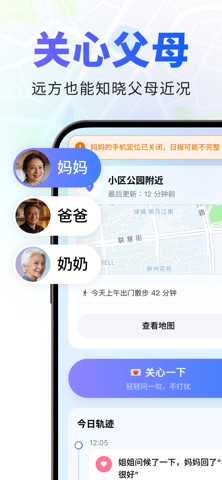
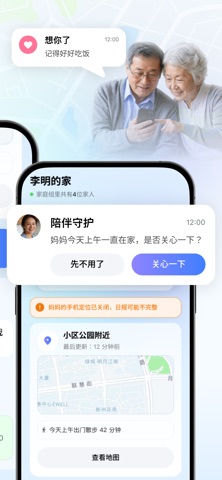
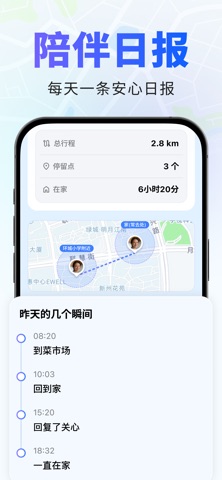
在哪,是一款为异地子女和父母设计的家庭关怀 App。 它不是用来监控父母,而是帮助你更自然地知道爸妈在哪、是否到家、今天过得是否安心。 每天早上,你可以收到一份陪伴日报,了解父母昨天的生活状态。想表达关心时,点一下“关心一下”,父母无需打字,就能用“我很好”“刚吃过饭”“我也想你”等快捷回应你。 主要功能: 陪伴日报:每天了解父母生活状态 父母定位:查看家人的最近位置 7 天轨迹:了解父母日常活动范围 电子围栏:到家、离家、到达常去地点时提醒 关心一下:低打扰表达惦记,父母一键回应 SOS 求助:紧急情况快速通知家人 家庭组协同:兄弟姐妹一起关心父母 在哪坚持隐私优先:位置数据仅在家庭成员之间共享,老人本人同意后才会开启。 欢迎加入「在哪」高级会员,给家人更安心的守护! 关于会员订阅、续费及管理的具体规则如下: 1. 订阅方案与资费 我们提供以下守护订阅服务供您选择: 周度会员(短期出行守护): ¥48 / 周(自动续期) 年度会员(全年长效安心): ¥198 / 年(自动续期) 2. 自动续订与扣款规则 扣款时间: 在当前订阅周期到期前 24 …
App details
What you can learn from 在哪-家人定位关心提醒
Every shipping app on the App Store has gone through the same decisions you're working through right now: which screenshot goes first, what caption sits over it, which device frame to show, what color the background should be. The 7 screenshots above are 在哪-家人定位关心提醒's answers to those questions — they're public, they're real, and they made it through Apple's review.
What the numbers say: 在哪-家人定位关心提醒 runs a light set with one background colour (#FCFCFC) carried across every screenshot — the listing reads as a single poster when the shots sit side by side in search results. The accent colour we picked up, #7C84FC, is the one to reuse for badges, arrows and highlighted words if you borrow this look. Hit Use this style to open the editor with these exact colours and drop your own screenshot in.
Notice the first screenshot in particular. It's the one users see in search results and on the product page, and it's where most apps spend their best caption and tightest design. Look at the proportion of background to phone, where the text sits, what one thing the image is trying to communicate.
Want to see how other Productivity apps approach the same problem? Browse more Productivity apps in the showcase.
Take what works into your own screenshots
Open LaunchShots and design your App Store & Google Play screenshots — pick a device frame, drop captions, ship in minutes. Free, in your browser.
Open the screenshot editor →Apps with a similar look
Closest background + accent colours among the listings we've analysed — useful when you want to see the same palette handled by a different team.