Screenshot style breakdown
Sampled from 3 of 恋愛温度計 - もしもの恋愛シミュレーター's App Store screenshots — background, accent and theme, measured by LaunchShots (not something Apple publishes).
#FCECF4 bg
#DDCFD6
#FC5C74 accent
#111111 text
Reading the caption text from the screenshots in your browser…
Screenshots


Icon palette
About this app
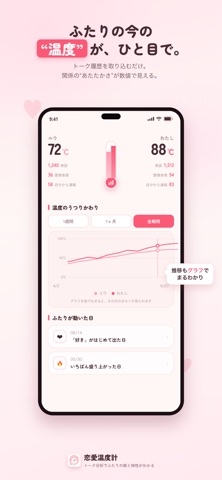
気になるあの人とのトーク、本当はどう思われてる? 恋愛温度計は、ふたりのトーク履歴を取り込むだけで“関係の温度”が見えてくる恋愛分析アプリ。 さらに「もしも」では、送り方を変えたら相手がどう返すかをAIが予測。今のトークへの返し方の提案や、ふたりの週間レポートも読めます。 ■ 取り込むだけ、あとは自動で分析 ・やりとりの量やテンポ、返信の速さ、盛り上がった日をグラフで可視化 ・ふたりの“関係の温度”をスコアで表示 ・毎日の小さな変化をやさしくまとめてお知らせ ※分析はすべて端末の中だけで完結。相手に通知が届いたり、バレることは一切ありません。 ■ 「もしも」——あの送信、変えていたら? 過去の自分のメッセージを書き換えると、「相手だったらどう返すか」をAIが“もしも”の続きとして予測。 さらに「返信を考える」では、今のトークにどう返すかを、あなたの話し方でAIが3案提案します。 ※実在の相手の発言ではなく、AIによる予測シミュレーションです。 ■ 週間レポート 今週のふたりの温度の変化や気づき、盛り上がった日をまとめて振…
App details
What you can learn from 恋愛温度計 - もしもの恋愛シミュレーター
Every shipping app on the App Store has gone through the same decisions you're working through right now: which screenshot goes first, what caption sits over it, which device frame to show, what color the background should be. The 3 screenshots above are 恋愛温度計 - もしもの恋愛シミュレーター's answers to those questions — they're public, they're real, and they made it through Apple's review.
What the numbers say: 恋愛温度計 - もしもの恋愛シミュレーター runs a light set with one background colour (#FCECF4) carried across every screenshot — the listing reads as a single poster when the shots sit side by side in search results. The accent colour we picked up, #FC5C74, is the one to reuse for badges, arrows and highlighted words if you borrow this look. Hit Use this style to open the editor with these exact colours and drop your own screenshot in.
Notice the first screenshot in particular. It's the one users see in search results and on the product page, and it's where most apps spend their best caption and tightest design. Look at the proportion of background to phone, where the text sits, what one thing the image is trying to communicate.
Want to see how other Lifestyle apps approach the same problem? Browse more Lifestyle apps in the showcase.
Take what works into your own screenshots
Open LaunchShots and design your App Store & Google Play screenshots — pick a device frame, drop captions, ship in minutes. Free, in your browser.
Open the screenshot editor →Apps with a similar look
Closest background + accent colours among the listings we've analysed — useful when you want to see the same palette handled by a different team.