Chart position — tracked daily by LaunchShots
Screenshot changes — detected by LaunchShots
Screenshot style breakdown
Sampled from 6 of ボイとれ!| ボイストレーニング・ミックスボイス・音程・裏声's App Store screenshots — background, accent and theme, measured by LaunchShots (not something Apple publishes).
#BC1C54 bg
#C53B6B
#CC648C accent
#FFFFFF text
Screenshots


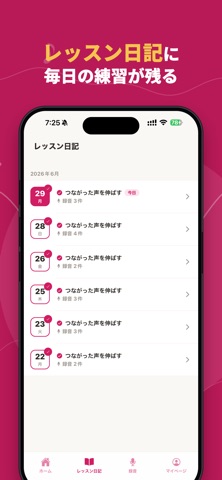
iPad screenshots


Icon palette
About this app
ボイとれ!は、あなたの声を「症状別」に診断し、その発声状態にいちばん合ったレッスンを選んでくれるボイストレーニングアプリです。 重要:この掲載情報で紹介している有料デジタル機能(声の診断、パーソナライズされたレッスン、録音、記録)の全利用には、別途アプリ内課金による購入が必要です。有料の自動更新サブスクリプション「ボイとれ!ベーシック」への購入登録後に利用できます。 やみくもに練習するのではなく、まず声の状態をチェック。張り上げ・裏返り・息っぽさ・地声と裏声のつなぎ目など、あなたのクセを見つけて、それを克服するための練習メニューだけを組みます。だから悪いクセが抜けて、力まずに高い声も低い声もきれいに出る、バランスの取れた発声に近づきます。 ■ こんなお悩みに ・ミックスボイスや高い声の出し方がわからない ・高い声が出ない、すぐ裏返る、つい張り上げてしまう ・裏声・地声・ファルセットをうまく使い分けたい ・ビブラートやベルティングに挑戦したい ・カラオケでもっと気持ちよく、楽に歌いたい ■ ボイと…
App details
What you can learn from ボイとれ!| ボイストレーニング・ミックスボイス・音程・裏声
Every shipping app on the App Store has gone through the same decisions you're working through right now: which screenshot goes first, what caption sits over it, which device frame to show, what color the background should be. The 15 screenshots above are ボイとれ!| ボイストレーニング・ミックスボイス・音程・裏声's answers to those questions — they're public, they're real, and they made it through Apple's review.
What the numbers say: ボイとれ!| ボイストレーニング・ミックスボイス・音程・裏声 runs a dark set with one background colour (#BC1C54) carried across every screenshot — the listing reads as a single poster when the shots sit side by side in search results. The accent colour we picked up, #CC648C, is the one to reuse for badges, arrows and highlighted words if you borrow this look. Hit Use this style to open the editor with these exact colours and drop your own screenshot in.
Notice the first screenshot in particular. It's the one users see in search results and on the product page, and it's where most apps spend their best caption and tightest design. Look at the proportion of background to phone, where the text sits, what one thing the image is trying to communicate.
Want to see how other Music apps approach the same problem? Browse more Music apps in the showcase.
Take what works into your own screenshots
Open LaunchShots and design your App Store & Google Play screenshots — pick a device frame, drop captions, ship in minutes. Free, in your browser.
Open the screenshot editor →Apps with a similar look
Closest background + accent colours among the listings we've analysed — useful when you want to see the same palette handled by a different team.