Screenshot style breakdown
Sampled from 6 of Pushary: AI Agent Approvals's App Store screenshots — background, accent and theme, measured by LaunchShots (not something Apple publishes).
#FCFCF4 bg
#DDDDD6
#1C4C4C accent
#111111 text
Reading the caption text from the screenshots in your browser…
Screenshots



Icon palette
About this app
Every AI agent you run, on one phone. Claude Code, Codex, Cursor, Gemini CLI and Hermes ask before a risky step, and you approve or deny from anywhere, not only at your desk or on your home Wi-Fi. Pushary runs on your agents' own hooks, so it works with API keys, Bedrock and Vertex too. WHY PUSHARY AI agents move fast and then stop cold the second they hit something risky. A file delete, a deploy, a shell command, a question about which approach to take. Pushary sends that moment to your phone so the work does not sit waiting at your desk. You answer in a tap and the agent picks up where it left off. WHAT YOU CAN DO Approve or deny tool calls. Every request arrives with the agent name, the tool, and the surrounding context, so you can decide with confidence. Risky actions are flagged. Deny with a note. Turn down an action and tell the agent what to do instead, in one step. Set per…
App details
What you can learn from Pushary: AI Agent Approvals
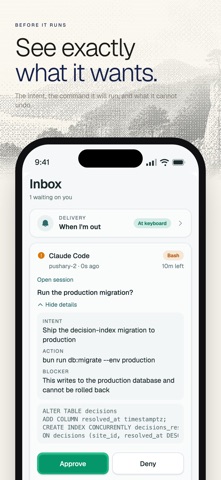
Every shipping app on the App Store has gone through the same decisions you're working through right now: which screenshot goes first, what caption sits over it, which device frame to show, what color the background should be. The 6 screenshots above are Pushary: AI Agent Approvals's answers to those questions — they're public, they're real, and they made it through Apple's review.
What the numbers say: Pushary: AI Agent Approvals runs a mixed light-and-dark set where the background shifts from screenshot to screenshot (first shot #FCFCF4) — each image has to stand on its own, so the captions carry more of the story. The accent colour we picked up, #1C4C4C, is the one to reuse for badges, arrows and highlighted words if you borrow this look. Hit Use this style to open the editor with these exact colours and drop your own screenshot in.
Notice the first screenshot in particular. It's the one users see in search results and on the product page, and it's where most apps spend their best caption and tightest design. Look at the proportion of background to phone, where the text sits, what one thing the image is trying to communicate.
Want to see how other Developer Tools apps approach the same problem? Browse more Developer Tools apps in the showcase.
Take what works into your own screenshots
Open LaunchShots and design your App Store & Google Play screenshots — pick a device frame, drop captions, ship in minutes. Free, in your browser.
Open the screenshot editor →Apps with a similar look
Closest background + accent colours among the listings we've analysed — useful when you want to see the same palette handled by a different team.