Chart position — tracked daily by LaunchShots
Screenshot style breakdown
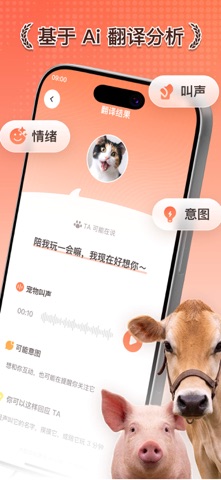
Sampled from 4 of 秒懂宠语大师's App Store screenshots — background, accent and theme, measured by LaunchShots (not something Apple publishes).
#FCFCFC bg
#DDDDDD
#FC8464 accent
#111111 text
Screenshots



Icon palette
About this app
我们一直觉得,宠物其实每天都在表达自己。 它突然叫一声、贴过来蹭你、盯着你看、摇尾巴、躲起来,可能都不是随机发生的。只是很多时候,我们听不懂,只能靠猜。 这个 App 想做的事情,就是让这种“猜”变得更有趣一点。 你可以录下宠物的叫声,让 AI 帮你分析它可能是在撒娇、害怕、无聊,还是只是单纯想引起你的注意。你也可以把自己想说的话转换成适合互动的宠物声音,看看它会不会有反应。 我们还做了一个宠物性格测试。不是那种很严肃的测评,更像是给毛孩子做一张小小的性格名片:它是高冷派、黏人精、好奇宝宝,还是每天都很有戏? 除了猫狗,我也希望这个应用能适合更多养小宠物的人。所以里面会有多动物适配,也有一些可以用来逗宠、安抚、呼唤、陪玩的互动声音。 它不是一本正经的动物语言翻译器,也不想假装自己真的能百分百听懂宠物。它更像是一个陪你观察宠物、逗逗它、理解它的小工具。 如果你也经常对着自己的毛孩子想: “你刚刚到底想说什么?” “你是不是饿了?” “你怎么又突然叫我?” “你这个性格到底随谁?” 那你应该会喜欢它。 …
App details
What you can learn from 秒懂宠语大师
Every shipping app on the App Store has gone through the same decisions you're working through right now: which screenshot goes first, what caption sits over it, which device frame to show, what color the background should be. The 4 screenshots above are 秒懂宠语大师's answers to those questions — they're public, they're real, and they made it through Apple's review.
What the numbers say: 秒懂宠语大师 runs a light set with one background colour (#FCFCFC) carried across every screenshot — the listing reads as a single poster when the shots sit side by side in search results. The accent colour we picked up, #FC8464, is the one to reuse for badges, arrows and highlighted words if you borrow this look. Hit Use this style to open the editor with these exact colours and drop your own screenshot in.
Notice the first screenshot in particular. It's the one users see in search results and on the product page, and it's where most apps spend their best caption and tightest design. Look at the proportion of background to phone, where the text sits, what one thing the image is trying to communicate.
Want to see how other Entertainment apps approach the same problem? Browse more Entertainment apps in the showcase.
Take what works into your own screenshots
Open LaunchShots and design your App Store & Google Play screenshots — pick a device frame, drop captions, ship in minutes. Free, in your browser.
Open the screenshot editor →Apps with a similar look
Closest background + accent colours among the listings we've analysed — useful when you want to see the same palette handled by a different team.