Chart position — tracked daily by LaunchShots
Screenshot style breakdown
Sampled from 5 of TimeMind — AI 任务管家's App Store screenshots — background, accent and theme, measured by LaunchShots (not something Apple publishes).
#141414 bg
#343434
#74ECD4 accent
#FFFFFF text
Reading the caption text from the screenshots in your browser…
Screenshots


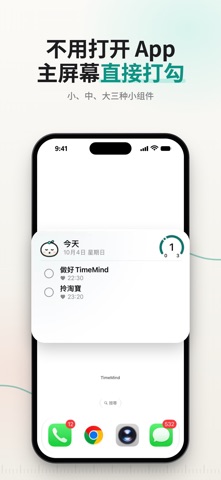

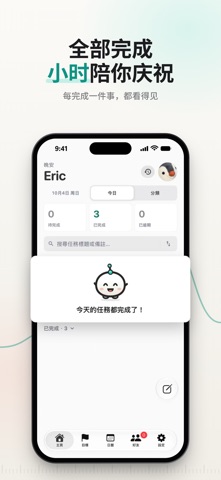
iPad screenshots


Icon palette
About this app
想到什么,就能记什么 — 让杂乱的念头变成可执行的下一步。 无论是灵光一闪、会议笔记、购物清单,还是临时接到的任务 — 你只需要打开 TimeMind,说一句、拍一张,剩下的交给 AI。 一句话建好任务 用你最自然的方式说"明天下午三点开会",AI 自动补上时间、地点和提醒。 普通话、英语、粤语混合都行 — TimeMind 在本机端做语音转文字, 离线也能用。 拍照直出任务 截图、海报、手写便签 — 拍下来,TimeMind 自动读出重点, 拆分成可管理的任务。"下周三交报告"看板上随手一拍, 变成你的下一件工作。 AI 好友"小时"陪你整理 小时会读取今天到期的任务,主动在合适的时机提醒你 — 不刷屏, 用你的语气。严肃时陪你严肃,想聊时陪你聊。 不是聊天机器人,而是陪你把事做完的搭档。 不再撞期、不再丢三落四 一周日历跨日任务自动成组,你一眼看清这周究竟有多少事, 并按优先级建议你今天先做哪一件。 和好友一起完成 指派任务给朋友,完成自动通知 — 不必在微信来回提醒, 不必再问"你看到我消息没"。 你的任务只有你自己看得到 时间、内容、照片、语音通通存在你的设备; 跨设备同…
App details
What you can learn from TimeMind — AI 任务管家
Every shipping app on the App Store has gone through the same decisions you're working through right now: which screenshot goes first, what caption sits over it, which device frame to show, what color the background should be. The 9 screenshots above are TimeMind — AI 任务管家's answers to those questions — they're public, they're real, and they made it through Apple's review.
What the numbers say: TimeMind — AI 任务管家 runs a mixed light-and-dark set where the background shifts from screenshot to screenshot (first shot #141414) — each image has to stand on its own, so the captions carry more of the story. The accent colour we picked up, #74ECD4, is the one to reuse for badges, arrows and highlighted words if you borrow this look. Hit Use this style to open the editor with these exact colours and drop your own screenshot in.
Notice the first screenshot in particular. It's the one users see in search results and on the product page, and it's where most apps spend their best caption and tightest design. Look at the proportion of background to phone, where the text sits, what one thing the image is trying to communicate.
Want to see how other Productivity apps approach the same problem? Browse more Productivity apps in the showcase.
Take what works into your own screenshots
Open LaunchShots and design your App Store & Google Play screenshots — pick a device frame, drop captions, ship in minutes. Free, in your browser.
Open the screenshot editor →Apps with a similar look
Closest background + accent colours among the listings we've analysed — useful when you want to see the same palette handled by a different team.