Screenshot changes — detected by LaunchShots
Screenshot style breakdown
Sampled from 5 of 日航宗 - JAL修行のためのツール's App Store screenshots — background, accent and theme, measured by LaunchShots (not something Apple publishes).
#BC1424 bg
#C53442
#540C14 accent
#FFFFFF text
Screenshots



Icon palette
About this app
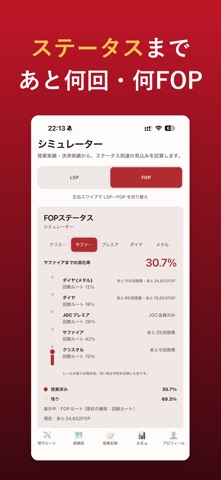
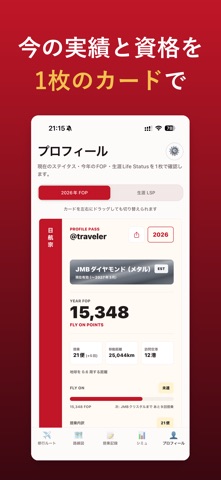
日航宗は、JAL(日本航空)で修行するあなたのための、国内線乗り継ぎ&FLY ONポイント支援アプリです。 ■ 自動FOP最大ルート検索 出発日・出発地・時間帯を指定するだけで、当日のJAL便から獲得FLY ONポイント(FOP)が最大になる乗り継ぎルートを自動で計算します。運賃前提(フレックス/セイバー等)も選べます。 ■ 手動での乗り継ぎ構築 便を1本ずつ選んで前後便をたどり、自分だけの修行ルートを組み立てられます。運航会社(JAL本体/JALグループ=J-AIR・JTA・JAC・HAC・RAC/天草・ORCなどの提携便)で絞り込みも可能です。 ■ 搭乗記録とFLY ONステータス管理 搭乗した便を記録すると、今年のFLY ONポイントが自動集計され、JMBクリスタル/サファイア/JGCプレミア/ダイヤモンド/ダイヤモンドメタルへの到達状況、あと何回でどの資格に届くかをグラフで確認できます。FOP単独ルートと搭乗回数併用ルートの両方に対応。前年度・今年度のステータスは手動でも申告できます。 ■ Life Status Points(LSP)シミュレーター JALの生涯実績「Life Status Point…
App details
What you can learn from 日航宗 - JAL修行のためのツール
Every shipping app on the App Store has gone through the same decisions you're working through right now: which screenshot goes first, what caption sits over it, which device frame to show, what color the background should be. The 5 screenshots above are 日航宗 - JAL修行のためのツール's answers to those questions — they're public, they're real, and they made it through Apple's review.
What the numbers say: 日航宗 - JAL修行のためのツール runs a dark set with one background colour (#BC1424) carried across every screenshot — the listing reads as a single poster when the shots sit side by side in search results. The accent colour we picked up, #540C14, is the one to reuse for badges, arrows and highlighted words if you borrow this look. Hit Use this style to open the editor with these exact colours and drop your own screenshot in.
Notice the first screenshot in particular. It's the one users see in search results and on the product page, and it's where most apps spend their best caption and tightest design. Look at the proportion of background to phone, where the text sits, what one thing the image is trying to communicate.
Want to see how other Travel apps approach the same problem? Browse more Travel apps in the showcase.
Take what works into your own screenshots
Open LaunchShots and design your App Store & Google Play screenshots — pick a device frame, drop captions, ship in minutes. Free, in your browser.
Open the screenshot editor →Apps with a similar look
Closest background + accent colours among the listings we've analysed — useful when you want to see the same palette handled by a different team.