Chart position — tracked daily by LaunchShots
Screenshot style breakdown
Sampled from 6 of TRACK HUB - 陸上練習ノート's App Store screenshots — background, accent and theme, measured by LaunchShots (not something Apple publishes).
#FCFCFC bg
#DDDDDD
#DC5C2C accent
#111111 text
Screenshots




Icon palette
About this app
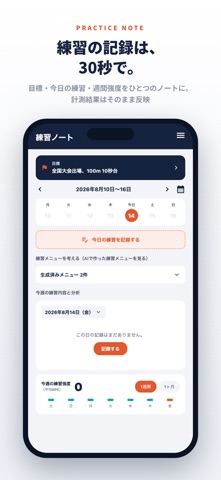
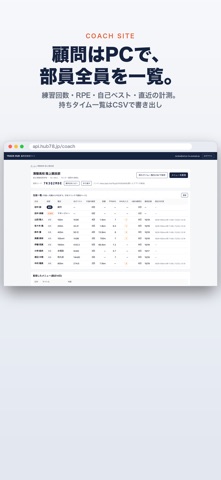
TRACK HUBは、陸上競技のための練習ノートアプリです。練習メニュー・本数・RPEを30秒で記録し、目標記録との差や今週の練習量をホームで確認。撮った動画からタイムを読む「動画タイム計測」、ストップウォッチ、部活向けのチーム機能まで、練習の記録に必要なものをひとつにまとめました。基本機能は無料で使えます。 ■練習ノート・目標 ・練習メニュー、本数・セット数、RPE(主観的強度)を専用キーパッドで30秒で記録 ・月カレンダーで練習日がひと目でわかり、同じメニューの前回と比べられます ・種目ごとの目標記録と自己ベストを登録。目標までの差がホームに表示 ・保存後に今週の練習回数・連続記録日数・負荷の変化をフィードバック ・計測ツールの結果は、すべてこのノートに自動で入ります ■動画タイム計測(NEW) ・普通に撮った動画をコマ送りして、スタートと通過点を押すだけ。区間タイムと累計が1/100秒で並びます ・三脚は不要。手持ちで選手を追って撮った動画でも分析できます ・距離を入れれば100mあたりのペース、歩数を入れればピッチとストラ…
App details
What you can learn from TRACK HUB - 陸上練習ノート
Every shipping app on the App Store has gone through the same decisions you're working through right now: which screenshot goes first, what caption sits over it, which device frame to show, what color the background should be. The 9 screenshots above are TRACK HUB - 陸上練習ノート's answers to those questions — they're public, they're real, and they made it through Apple's review.
What the numbers say: TRACK HUB - 陸上練習ノート runs a mixed light-and-dark set where the background shifts from screenshot to screenshot (first shot #FCFCFC) — each image has to stand on its own, so the captions carry more of the story. The accent colour we picked up, #DC5C2C, is the one to reuse for badges, arrows and highlighted words if you borrow this look. Hit Use this style to open the editor with these exact colours and drop your own screenshot in.
Notice the first screenshot in particular. It's the one users see in search results and on the product page, and it's where most apps spend their best caption and tightest design. Look at the proportion of background to phone, where the text sits, what one thing the image is trying to communicate.
Want to see how other Sports apps approach the same problem? Browse more Sports apps in the showcase.
Take what works into your own screenshots
Open LaunchShots and design your App Store & Google Play screenshots — pick a device frame, drop captions, ship in minutes. Free, in your browser.
Open the screenshot editor →Apps with a similar look
Closest background + accent colours among the listings we've analysed — useful when you want to see the same palette handled by a different team.