Chart position — tracked daily by LaunchShots
Screenshot changes — detected by LaunchShots
Screenshot style breakdown
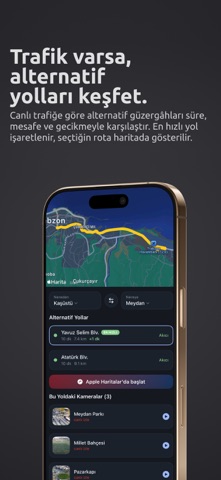
Sampled from 4 of Trabzon Trafik & Canlı Kamera's App Store screenshots — background, accent and theme, measured by LaunchShots (not something Apple publishes).
#24242C bg
#424249
#7C644C accent
#FFFFFF text
Reading the caption text from the screenshots in your browser…
Screenshots



Icon palette
About this app
Trabzon'da yola çıkmadan önce bakılacak tek uygulama. Sahil yolunda trafik var mı, Değirmendere sıkışık mı, Sultanmurat'ta kar yağıyor mu: hepsi tek ekranda, canlı. CANLI TRAFİK DURUMU Trabzon'un ana yollarındaki anlık yoğunluğu görün. Her güzergâh için tahmini süre, normalden ne kadar geciktiğiniz ve renkli trafik akışı haritada. Sahil yolu, Değirmendere, Havalimanı, Akyazı, Tanjant ve daha fazlası. UÇUŞ TAKİBİ Trabzon Havalimanı'na inen ve buradan kalkan uçaklar: planlanan ve gerçekleşen saatler, rötar durumu, kapı ve bagaj bandı bilgisi. Havadaki uçakları harita üzerinde canlı izleyin. TRAFİK BİLDİRİMLERİ Takip ettiğiniz güzergâh yoğunlaşınca telefonunuza haber gelsin: Değirmendere içi (havalimanı ve merkez yönü), sahil yolunun her iki istikameti ve diğer kritik güzergâhlar için ayrı ayrı bildirim açabilirsiniz. Uyarı hassasiyetini, sessiz saatleri ve sabah/akşam özet saatini kend…
App details
What you can learn from Trabzon Trafik & Canlı Kamera
Every shipping app on the App Store has gone through the same decisions you're working through right now: which screenshot goes first, what caption sits over it, which device frame to show, what color the background should be. The 4 screenshots above are Trabzon Trafik & Canlı Kamera's answers to those questions — they're public, they're real, and they made it through Apple's review.
What the numbers say: Trabzon Trafik & Canlı Kamera runs a dark set with one background colour (#24242C) carried across every screenshot — the listing reads as a single poster when the shots sit side by side in search results. The accent colour we picked up, #7C644C, is the one to reuse for badges, arrows and highlighted words if you borrow this look. Hit Use this style to open the editor with these exact colours and drop your own screenshot in.
Notice the first screenshot in particular. It's the one users see in search results and on the product page, and it's where most apps spend their best caption and tightest design. Look at the proportion of background to phone, where the text sits, what one thing the image is trying to communicate.
Want to see how other Navigation apps approach the same problem? Browse more Navigation apps in the showcase.
Take what works into your own screenshots
Open LaunchShots and design your App Store & Google Play screenshots — pick a device frame, drop captions, ship in minutes. Free, in your browser.
Open the screenshot editor →Apps with a similar look
Closest background + accent colours among the listings we've analysed — useful when you want to see the same palette handled by a different team.