Screenshot changes — detected by LaunchShots
Screenshot style breakdown
Sampled from 4 of WAGCODE's App Store screenshots — background, accent and theme, measured by LaunchShots (not something Apple publishes).
#FCFCFC bg
#DDDDDD
#4CB474 accent
#111111 text
Reading the caption text from the screenshots in your browser…
Screenshots



Icon palette
About this app
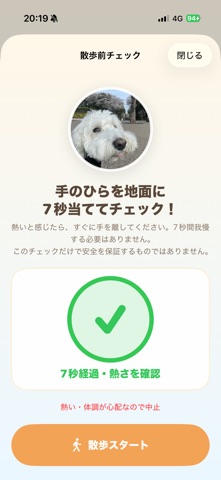
今日、散歩どうする?から始まる、うちの子との毎日。 WAGCODEは、天気・気温・体感温度・推定路面温度を見て、愛犬との散歩前を確認し、写真と日記まで残せるアプリです。 【散歩前に、足元のチェック】 ・現在地の天気、気温、体感温度、推定路面温度 ・アスファルト、コンクリート、芝生/土に合わせた路面の推定 ・時間帯ごとの散歩目安と、今日/明日の天気 ・手のひらで実際の地面を確かめる7秒チェック ・雨や雪の日の足元注意 【愛犬が、いつもの相棒に】 ・名前、犬種、年齢区分、体格、性別、飼い主の呼び名を登録 ・晴れの日/雨の日の愛犬写真や、解放済みキャラクターを表示 ・10問でわかる20タイプの性格診断 ・性格、季節、天気、その子らしい話し方に合わせた「愛犬からの言葉」 ・一部の性格タイプでは、完了済みの散歩記録に応じたひと言も表示 【散歩から、日記と共有まで】 ・散歩開始、帰宅、写真とメモの記録 ・日記の写真を拡大・移動し、枠に合わせて切り抜き ・飼い主から返事を残せる「今日の1ページ」 ・愛犬写真、犬種、男の子/女の…
App details
What you can learn from WAGCODE
Every shipping app on the App Store has gone through the same decisions you're working through right now: which screenshot goes first, what caption sits over it, which device frame to show, what color the background should be. The 4 screenshots above are WAGCODE's answers to those questions — they're public, they're real, and they made it through Apple's review.
What the numbers say: WAGCODE runs a light set where the background shifts from screenshot to screenshot (first shot #FCFCFC) — each image has to stand on its own, so the captions carry more of the story. The accent colour we picked up, #4CB474, is the one to reuse for badges, arrows and highlighted words if you borrow this look. Hit Use this style to open the editor with these exact colours and drop your own screenshot in.
Notice the first screenshot in particular. It's the one users see in search results and on the product page, and it's where most apps spend their best caption and tightest design. Look at the proportion of background to phone, where the text sits, what one thing the image is trying to communicate.
Want to see how other Weather apps approach the same problem? Browse more Weather apps in the showcase.
Take what works into your own screenshots
Open LaunchShots and design your App Store & Google Play screenshots — pick a device frame, drop captions, ship in minutes. Free, in your browser.
Open the screenshot editor →Apps with a similar look
Closest background + accent colours among the listings we've analysed — useful when you want to see the same palette handled by a different team.