Chart position — tracked daily by LaunchShots
Screenshot style breakdown
Sampled from 6 of Word Legends 英単語・熟語学習's App Store screenshots — background, accent and theme, measured by LaunchShots (not something Apple publishes).
#F4F4E4 bg
#D6D6C8
#A4443C accent
#111111 text
Reading the caption text from the screenshots in your browser…
Screenshots


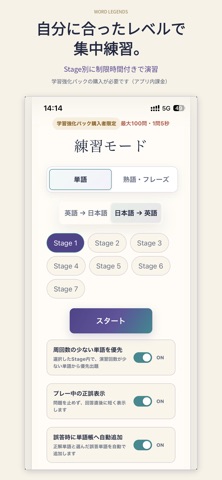
iPad screenshots


Icon palette
About this app
あなたの語彙力を、試そう。 Word Legendsは、英単語と熟語・フレーズを4択クイズで学ぶ英語学習アプリです。 33,000語以上の英単語と15,000以上の熟語・フレーズを収録。中学・高校の基礎語彙から、ネイティブでも手応えを感じる難語まで、幅広く挑戦できます。 ■ 積み重ねを、レート・ランキングに。 レーティング戦で、今の語彙力を確かめよう。解答結果に応じて変動するレートと称号が、次の目標になります。ランキングでほかの学習者と競いながら、上位を目指せます。 ■ 単語の先へ。熟語も攻略。 単語だけでなく、熟語やフレーズも豊富に収録。「英語→日本語」「日本語→英語」の両方向から、意味と表現を結びつけて学べます。 ■ 間違えた一問を、次の正解に。 解答後は、正解だけでなく選択肢の意味も確認できます。似た単語との違いを整理し、覚えておきたい語句は単語帳へ。挑戦と復習を繰り返して、知識を積み重ねましょう。 ■ 一語を、深く知る。 単語詳細では、日本語訳・発音記号・英語の定義・例文を確認できます。音声で発音も確かめながら、意味…
App details
What you can learn from Word Legends 英単語・熟語学習
Every shipping app on the App Store has gone through the same decisions you're working through right now: which screenshot goes first, what caption sits over it, which device frame to show, what color the background should be. The 9 screenshots above are Word Legends 英単語・熟語学習's answers to those questions — they're public, they're real, and they made it through Apple's review.
What the numbers say: Word Legends 英単語・熟語学習 runs a light set with one background colour (#F4F4E4) carried across every screenshot — the listing reads as a single poster when the shots sit side by side in search results. The accent colour we picked up, #A4443C, is the one to reuse for badges, arrows and highlighted words if you borrow this look. Hit Use this style to open the editor with these exact colours and drop your own screenshot in.
Notice the first screenshot in particular. It's the one users see in search results and on the product page, and it's where most apps spend their best caption and tightest design. Look at the proportion of background to phone, where the text sits, what one thing the image is trying to communicate.
Want to see how other Education apps approach the same problem? Browse more Education apps in the showcase.
Take what works into your own screenshots
Open LaunchShots and design your App Store & Google Play screenshots — pick a device frame, drop captions, ship in minutes. Free, in your browser.
Open the screenshot editor →Apps with a similar look
Closest background + accent colours among the listings we've analysed — useful when you want to see the same palette handled by a different team.