Chart position — tracked daily by LaunchShots
Screenshot style breakdown
Sampled from 5 of ねこ勤怠 作業記録をつけるにゃー's App Store screenshots — background, accent and theme, measured by LaunchShots (not something Apple publishes).
#ECF4F4 bg
#CFD6D6
#84D4EC accent
#111111 text
Reading the caption text from the screenshots in your browser…
Screenshots


Icon palette
About this app
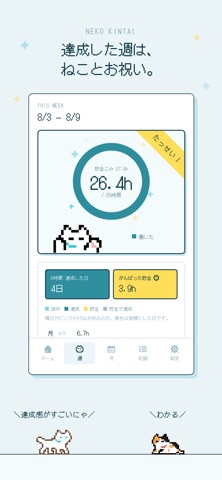
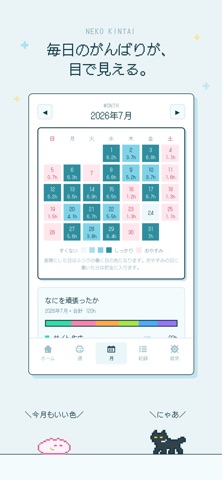
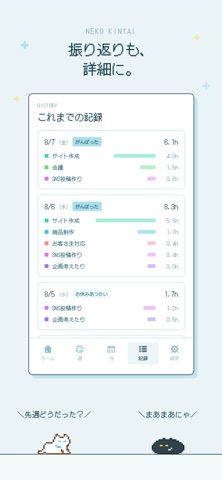
はたらいた時間を、きろくするにゃ! ねこ勤怠は、仕事・創作・勉強など、じぶんで決めた活動の時間を、ドット絵のねこと一緒に記録するアプリです。 出勤ボタンを押すとねこが歩きはじめ、休憩や退勤もワンタップ。集中したいときは、作業用BGMを流しながら取り組めます。 じぶんで決めた目標にむかって、ねこと一緒にのんびり歩いていきましょう。 ▼ とくちょう ・出勤・退勤・休憩をワンタップで記録できます ・作業カテゴリを切り替えたり、好きな順に並べ替えたりできます ・1日の目標に向かって、ドット絵のねこがてくてく歩きます ・集中したい時間に流せる作業用BGMを収録しています ・相棒のねこは15匹。名前をつけたり、好きな順に並べ替えたりできます ・場面に合わせて変わる、ねこのセリフをたっぷり楽しめます ・週の目標と月のカレンダーで、毎日のがんばりを振り返れます ・おやすみの日に働いた分は「がんばった貯金」になります ・目標に届いた週は、ねこと一緒にお祝いできます ・記録はすべて端末の中。アカウント不要・広告なし・トラッキン…
App details
What you can learn from ねこ勤怠 作業記録をつけるにゃー
Every shipping app on the App Store has gone through the same decisions you're working through right now: which screenshot goes first, what caption sits over it, which device frame to show, what color the background should be. The 5 screenshots above are ねこ勤怠 作業記録をつけるにゃー's answers to those questions — they're public, they're real, and they made it through Apple's review.
What the numbers say: ねこ勤怠 作業記録をつけるにゃー runs a light set with one background colour (#ECF4F4) carried across every screenshot — the listing reads as a single poster when the shots sit side by side in search results. The accent colour we picked up, #84D4EC, is the one to reuse for badges, arrows and highlighted words if you borrow this look. Hit Use this style to open the editor with these exact colours and drop your own screenshot in.
Notice the first screenshot in particular. It's the one users see in search results and on the product page, and it's where most apps spend their best caption and tightest design. Look at the proportion of background to phone, where the text sits, what one thing the image is trying to communicate.
Want to see how other Productivity apps approach the same problem? Browse more Productivity apps in the showcase.
Take what works into your own screenshots
Open LaunchShots and design your App Store & Google Play screenshots — pick a device frame, drop captions, ship in minutes. Free, in your browser.
Open the screenshot editor →Apps with a similar look
Closest background + accent colours among the listings we've analysed — useful when you want to see the same palette handled by a different team.